
SEO Automation for Small Businesses: The Complete 2026 Playbook
SEO automation for small businesses is the practice of using software to run repetitive SEO tasks — crawling, rank tracking, reporting, and alerting — automatically, so lean teams win back hours and keep rankings stable. In short, it turns a fragile manual process into a reliable, scalable engine that works even when you are focused elsewhere. Written by Rank Authority. Last updated: 2026-07-02. Last updated: 2026-06-02. Author: Rank Authority. Written by the Rank Authority editorial team — add an author byline and a short bio block (name, role, credentials, and one-sentence experience) under the intro to strengthen E‑E‑A‑T.
What you will gain from this guide
- A clear definition of SEO automation and why small businesses need it now
- Step-by-step workflow setup you can launch this week
- Tool-by-tool breakdowns, budget tiers, and real cost guidance
- Local SEO automation tactics that national guides ignore
- Mistakes to avoid and governance rules to keep automation safe
Reading time: approximately 12 minutes — add author byline and last-updated date.

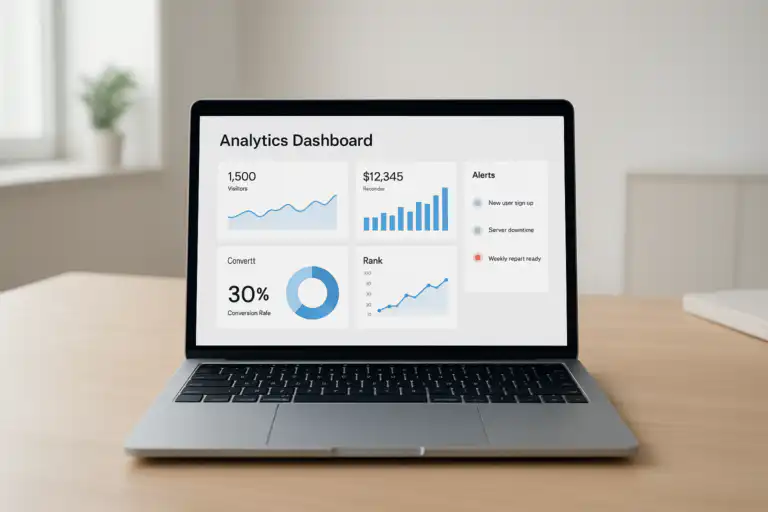
A unified SEO dashboard makes automated progress visible and actionable at a glance.
What Is SEO Automation for Small Businesses?
SEO automation for small businesses is the use of software rules, schedules, and triggers to perform routine search optimisation tasks without manual effort. Specifically, tools crawl your pages, record keyword rankings, check on-page elements, and compile reports — all on a set schedule or when a change is detected.
For small business owners, time is the scarcest resource. Therefore, automation is not a luxury — it is a necessity. A solo operator or two-person marketing team simply cannot manually check hundreds of pages, dozens of keywords, and multiple local listings every week. However, an automated system can do all of that overnight and deliver a summary by morning. Learn more about AI SEO strategies.
It is important to understand what automation does not replace; read what to know before using SEO automation. You still set strategy, approve significant changes, write quality content, and interpret results. In contrast, the repetitive checking, flagging, and report-building runs without you. As a result, your limited hours flow toward decisions that actually move the needle.
Quick definition: SEO automation is software-driven execution of SEO tasks on a schedule or trigger. Think of it as a tireless assistant that checks everything you have told it to check — every day, every hour — and only calls you when something needs attention.
Why Small Businesses Need SEO Automation More Than Anyone
Large enterprises employ entire SEO teams. Consequently, they catch broken links, drifting rankings, and missing schema within hours. Small businesses, however, rarely have that luxury. Furthermore, the cost of missed SEO issues compounds quickly — a single undetected 404 on a product page can bleed organic traffic for weeks.
Automation levels that playing field. Specifically, a small business running automated SEO monitoring can detect and fix issues at the same speed as a large brand — for a fraction of the cost. In addition, consistent automated reporting proves SEO value to stakeholders without consuming hours building decks.
The three core problems automation solves
Manual SEO audits take 4–8 hours per site per month. Therefore, most small businesses skip them. Automation runs the same checks weekly — or even daily — with zero additional time from you.
Human-led processes drift. For example, rank tracking gets skipped during a busy season and suddenly you have no baseline data. In contrast, automated schedules run regardless of how full your calendar is.
Without monitoring, a technical error can sit undetected for days or weeks. As a result, rankings drop before you even know there is a problem. Real-time alerts flip that equation entirely.
How SEO Automation for Small Businesses Actually Works
At its core, SEO automation connects several tools into a single workflow. Specifically, a site crawler, a rank tracker, an on-page content analyser, and a reporting dashboard all exchange data automatically. Consequently, issues surface as alerts and wins appear in scheduled reports — no manual compilation needed. Learn the best way to automate SEO with practical integration patterns.
The automated SEO data pipeline
- Data collection: Crawlers scan your pages for technical errors, broken links, and missing tags. Rank trackers record keyword positions daily. Analytics pull traffic and conversion data.
- Rule evaluation: Your automation rules compare incoming data against thresholds you set. For instance, “alert me if any page drops more than 5 positions in 24 hours.”
- Action triggering: When a rule fires, the system takes a defined action — sending an email alert, creating a task in your project tool, or logging a note in the dashboard.
- Reporting: At scheduled intervals, the system compiles metric summaries and emails them to stakeholders. Therefore, everyone stays informed without a manual reporting cycle.
For example, imagine a product page URL changes after a site update. As a result, the old URL generates a 404 error. How to leverage automation explains connecting monitors to workflows so issues are resolved before customers see them. Your automated monitor detects this within the next crawl cycle, opens a task in your workflow tool, and alerts your inbox — all before a single customer encounters the dead link. In contrast, without automation, that error could linger for weeks.
“Automate what repeats, schedule what matters, review what changes. Because of this rhythm, your SEO stays healthy without burning your most limited resource — time.”
Core SEO Automation Concepts: A Plain-Language Glossary
Before building your first workflow, it helps to understand the key terms. Below is a plain-language glossary so your team can set up consistent, reusable processes.
The Best SEO Automation Tools for Small Businesses in 2026
Choosing the right tools is the most practical question small business owners ask. Therefore, this section breaks down the leading options by category — with honest notes on price and fit for lean teams. Read more about how to leverage automation for better SEO results.
Site Crawlers and Technical Auditors
The industry-standard desktop crawler. Specifically, it flags broken links, duplicate titles, missing meta descriptions, redirect chains, and page speed signals. The free version crawls up to 500 URLs. In addition, the paid licence at around £209/year unlocks scheduled crawls and JavaScript rendering — both critical for modern sites.
A visual-first crawler ideal for non-technical owners. Furthermore, its hint system explains every issue in plain language and prioritises fixes by impact. Pricing starts at around $13.50/month, making it accessible for small teams.
Above all, no small business should skip this free tool. It reports index coverage errors, Core Web Vitals scores, and manual actions directly from Google. As a result, it is the most reliable signal source available — and it costs nothing.
Rank Tracking Tools
Daily automated rank tracking for unlimited keywords on the paid plan. Specifically, it tracks local pack positions, featured snippets, and SERP features. Consequently, you see which pages are climbing or slipping before it affects traffic.
Tracks rankings across countries, devices, and languages. In addition, its Share of Voice metric shows whether your overall visibility is growing — not just individual keywords.
A budget-friendly option starting at around $29/month. For small businesses tracking 50–200 keywords, it delivers daily updates, email alerts, and a clean mobile app without the complexity of enterprise tools.
All-in-One SEO Platforms
Combines site auditing, rank tracking, content analysis, and backlink monitoring in one platform. For small businesses, the Pro plan at $139.95/month covers most automation needs. However, the learning curve is steep — plan for a few hours of setup. Before purchasing, review what to know before using SEO automation.
Particularly strong for backlink analysis and keyword research automation. In addition, its Site Audit tool now runs on cloud — meaning it crawls automatically without desktop software. Plans start at $129/month.
Built specifically for small business SEO automation, Rank Authority delivers real-time issue alerts, automated reporting, and guided workflows without the complexity of enterprise tools. Furthermore, it is designed for owners — not agencies — so setup is fast and results are clear.
Reporting and Dashboard Tools
Connects to Google Search Console, Google Analytics, and third-party SEO tools. Consequently, you build automated dashboards that refresh daily and email to stakeholders on a schedule — all at zero cost.
Ideal for small businesses working with an SEO consultant or agency. It automates white-label reports, integrates rank tracking and analytics, and sends scheduled PDF summaries without manual exports. For tool selection and platform workflows, read the Automated SEO platform guide.
Local SEO Automation: A Dedicated Strategy for Small Businesses
Local SEO automation benefits from automation more than almost any other niche. Specifically, local businesses must maintain consistent NAP data (Name, Address, Phone number — the three data points Google uses to verify your business identity across the web), monitor Google Business Profile performance, and track “service + city” keyword rankings across multiple locations.

Automated local SEO keeps listings consistent and boosts nearby discovery.
Five local SEO tasks to automate immediately
- NAP consistency monitoring: Tools like Yext, BrightLocal, or Semrush Listing Management automatically scan directories for mismatched phone numbers, wrong addresses, or outdated hours. As a result, you fix inconsistencies before they confuse Google’s local ranking algorithm.
- Google Business Profile performance tracking: Connect your GBP to Looker Studio and automatically pull weekly metrics — profile views, direction requests, call clicks, and photo views. Consequently, you spot seasonal trends and optimise accordingly.
- Local pack rank tracking: Configure your rank tracker to monitor “service + city” phrases daily. For instance, track “plumber Bristol” and “emergency plumber Bristol” separately, since local pack and organic positions can diverge significantly.
- Location page audits: Schedule weekly crawls of your location pages specifically. In particular, flag missing city names in H1 headings, absent local phone numbers, and broken maps embeds.
- Review request automation: Use tools like Birdeye or GatherUp to send timed review request emails after a service is completed. Furthermore, set up reply templates so every review receives a response — a positive local ranking signal.
For foundational context, see the Search engine optimisation overview on Wikipedia to anchor your strategy before automating specifics.
Building Your SEO Automation Workflow: Step-by-Step
The most common mistake is trying to automate everything at once. Therefore, start with a narrow goal, prove value quickly, and expand from there. In short, a workflow you actually use beats a complex system that sits unconfigured. If you need help deciding whether automation is right for you, see Is automated SEO worth it.

- Define a specific outcome. Write one sentence: “This workflow will reduce 404 errors to zero within 30 days.” Because of this clarity, every tool and rule you add has a purpose. Vague goals produce vague workflows.
- Choose your triggers. Decide when each check runs. For example, crawl the full site weekly and run lightweight checks after every deployment. Additionally, set real-time alerts for critical errors like site-wide 5xx status codes.
- Select and connect your tools. Learn how to leverage automation for better SEO results. Pick a crawler, a rank tracker, and a reporting destination. Next, connect them via native integrations, Zapier, or API. Specifically, confirm that alerts reach the right person — not just a shared inbox no one monitors.
- Map every action. For each rule that fires, define the exact response: create a task, send a Slack message, log to a spreadsheet. Furthermore, assign an owner to each action type so nothing sits unresolved.
- Test thoroughly before going live. Run the workflow in a staging environment first. Specifically, introduce deliberate errors — a broken link, a missing title — and confirm that alerts fire correctly. In addition, check for false positives that would create alert fatigue.
- Tune thresholds after the first two weeks. Real-world data will reveal which rules are too sensitive and which are too loose. Consequently, you will refine alert thresholds until only actionable signals reach your inbox.
- Document the workflow on one page. Write the owner, schedule, tools, rules, and escalation path. As a result, anyone on your team can run the workflow — and you can hand it off without a meeting.
For real-time alert setup, explore Rank Authority’s real-time SEO issue alerts to cut response times after changes go live.
Which SEO Tasks Should Small Businesses Automate First?
Start with monitoring — it protects existing traffic. For background, see Is automated SEO worth it? Therefore, your first automation should catch problems before they cost you rankings or revenue. After that, automate reporting so stakeholders see progress without chasing you for updates.
Priority 1: Technical monitoring
- 404 error detection: Set up weekly crawls and real-time uptime monitoring. Specifically, any page returning a 4xx or 5xx status code should trigger an immediate alert.
- Redirect chain checks: Automated crawls flag chains longer than two hops. As a result, you clean them up before they waste crawl budget and dilute link equity.
- Core Web Vitals tracking: Connect Google Search Console data to your dashboard. Furthermore, set an alert if any URL’s LCP (Largest Contentful Paint — the time it takes for the main content to appear on screen) drops below the “Good” threshold.
- Meta tag audits: Weekly crawls flag duplicate or missing title tags and meta descriptions across the full site. Consequently, you fix them before they damage click-through rates.
Priority 2: Rank and visibility tracking
- Daily keyword rank tracking: Automate position recording for your top 20–50 keywords. Specifically, set alerts for any keyword that drops five or more positions overnight.
- Competitor rank monitoring: Track two or three key competitors’ positions for the same keywords. As a result, you spot when a competitor gains ground and investigate why.
- Featured snippet and SERP feature tracking: Note which keywords trigger rich results, local packs, or featured snippets. Furthermore, track whether you own those features or a competitor does.
Priority 3: On-page content checks
- Duplicate title and description detection: Automated crawls flag pages sharing identical meta elements. In contrast, unique tags help each page target distinct search intent.
- Thin content alerts: Set word-count floors by page type. For example, service pages should exceed 600 words; blog posts should exceed 1,000 words. Pages falling below the threshold get flagged for enrichment.
- Internal linking suggestions: Some platforms now automate internal link recommendations from pillar content to supporting pages. Similarly, they flag orphan pages (pages with no internal links pointing to them) that are invisible to crawlers.
Priority 4: Reporting automation
- Weekly performance summaries: Schedule automated email reports every Monday covering traffic trends, ranking changes, and error counts. Therefore, stakeholders stay informed with zero manual effort.
- Monthly SEO health reports: Generate a monthly PDF summarising technical health score, top-ranking pages, keyword gains and losses, and backlink changes. Consequently, you have a clear record of progress over time.
Metrics and Dashboards for Automated SEO
A good SEO dashboard answers one question in under five seconds: “Is our search performance healthy?” Therefore, structure your metrics into three clear groups — health, growth, and effort. In addition, highlight exceptions and trends rather than raw totals, which rarely tell you what to do next.
For further guidance on aligning metrics with business decisions, review these SEO insights for business owners from Rank Authority. For a deeper walkthrough, see our SEO Action Plan for Small Businesses: 2024 Guide.
Budgeting Your SEO Automation Stack
Budget is the most common concern for small businesses exploring automation. Therefore, this section gives realistic cost ranges for three stages of investment. In short, start with essentials and add tools only when you have proven the value of what you already have. See our guide to affordable SEO solutions for practical, budgeted options.
Starter Tier — $0–$50/month
Ideal for businesses with under 100 pages and one location. Specifically, use Google Search Console (free) for technical monitoring, Google Analytics 4 (free) for traffic tracking, and Looker Studio (free) for automated dashboards. Additionally, add a budget rank tracker like SerpWatcher’s starter plan at $29/month.
Best for: Solo operators, service businesses, and single-location retailers.
Growth Tier — $50–$200/month
Add a dedicated crawler like Screaming Frog (£209/year) or Sitebulb ($13.50/month), a mid-range rank tracker, and a local citation management tool like BrightLocal ($39/month). Furthermore, this tier unlocks automated weekly reports and multi-location monitoring.
Best for: Multi-location businesses, growing e-commerce sites, and service-area businesses.
Pro Tier — $200–$500/month
At this level, invest in an all-in-one platform like Semrush or Ahrefs plus API integrations that push data directly into your CMS or data warehouse. Consequently, reporting becomes fully automated and your team acts on live data rather than monthly snapshots.
Best for: Established businesses with 500+ pages, multiple locations, or in-house marketing teams.
Content and On-Page Automation: Keeping Pages Sharp at Scale
Technical automation is the foundation — but on-page automation is where rankings are won. Specifically, consistent content quality across dozens or hundreds of pages is impossible to maintain manually. Therefore, set structured rules that flag issues and route fixes automatically. For broader tactics, review our SEO strategies for small businesses.
Content automation rules to implement now
- Word-count floors by page type: Set minimum word counts — 600 for service pages, 300 for FAQs, 1,000 for blog posts. In addition, pages falling below the floor get automatically added to your content backlog with a freshness date.
- Freshness windows: Flag pages that have not been updated in 12 months. Specifically, Google’s freshness signals favour recently updated content for competitive or time-sensitive queries.
- Internal link automation: Tools like Link Whisper (for WordPress) automatically suggest relevant internal links as you publish new content. Furthermore, they flag orphan pages that have no inbound internal links.
- Schema validation: Automated schema checkers verify that your FAQ, Product, LocalBusiness, and Article markup is correctly structured. As a result, you maintain eligibility for rich results without manual testing after every update.
- Image alt text audits: Weekly crawls flag images with missing or generic alt text. Consequently, you improve both accessibility and image search visibility at scale.
Pros and Cons of SEO Automation for Small Businesses
Automation is powerful — but it is not perfect. Therefore, weigh the genuine benefits against the real risks so you build guardrails from day one.
Governance and Human Review: Keeping Automation Safe
Automation without guardrails is a liability. Therefore, establish clear rules about which actions require human approval before executing. Specifically, any change that affects indexed URLs — redirects, canonical tags, title tags on high-traffic pages — should go through a review step before it fires automatically.
Four governance rules every small business should follow
- Route high-impact changes to a human approver. For example, any automated suggestion that touches a redirect, canonical URL, or page title on a top-10 traffic page should require one-click approval before deploying.
- Log every automated action with a timestamp. Because of this log, you can trace exactly what changed, when it changed, and which rule triggered it. As a result, debugging becomes straightforward when something unexpected happens.
- Schedule monthly workflow reviews. Automation workflows become stale. For instance, a rule that flagged thin pages at 300 words may be irrelevant after you update your content standards. Furthermore, stale rules create false positives that erode trust in the system.
- Assign a named owner to every workflow. If no one owns it, no one maintains it. Consequently, designate one person responsible for each workflow — even if that person is you.
Common SEO Automation Mistakes and How to Avoid Them
Most automation failures are preventable. Specifically, they stem from vague goals, oversized initial scope, and thresholds set without real-world data. Therefore, learning from these mistakes in advance saves weeks of frustration.
The seven most common automation mistakes
- Automating without a clear success metric. As a result, you cannot tell whether the workflow is working. Before launching any automation, write a one-sentence win statement: “This workflow will catch and resolve 404 errors within 48 hours.”
- Trying to automate everything at once. In contrast, a single well-tuned workflow delivers more value in week one than a sprawling system that takes months to configure. Start narrow.
- Setting alert thresholds too low. Specifically, if every minor metric fluctuation triggers an alert, your inbox becomes noise. Consequently, you start ignoring alerts — including the important ones.
- Automating content generation without editorial review. AI-generated content at scale without human oversight produces generic, unhelpful pages that can trigger Google quality penalties. Therefore, automate the identification of content gaps — not the writing itself.
- Monitoring staging and production with the same rules. Staging environments generate false positives that pollute your alert history. Furthermore, they obscure real production issues. Keep monitoring environments separate.
- Tracking vanity metrics instead of business outcomes. Total impressions mean little if revenue is flat. Specifically, connect your SEO metrics to conversion and revenue data so your automation measures what actually matters.
- Neglecting workflow maintenance. An unreviewed automation is an unreliable automation. Therefore, schedule quarterly audits of every active workflow to verify it is still relevant and accurate.
Frequently Asked Questions About SEO Automation for Small Businesses
What should a small business automate first in SEO?
Start with weekly site crawls, daily rank tracking, and real-time error alerts. These three automations protect existing traffic, catch problems early, and give you consistent data. Furthermore, they are quick to set up and deliver visible results within the first week.
How much does SEO automation cost for a small business?
You can build a functional starter stack for $0–$50/month using Google Search Console, Google Analytics 4, and Looker Studio — all free. As a result, even the tightest budget can access automated monitoring and reporting. Paid plans that add crawlers and rank tracking typically cost $50–$200/month for small businesses.
Can SEO automation replace an SEO professional?
No. SEO automation handles the repetitive monitoring and reporting tasks. However, strategy, content creation, link building, and interpreting complex data still require human expertise and judgement. For an in-depth discussion, see Is automated SEO worth it. Specifically, automation is a force multiplier for a skilled person — not a replacement for one.
Is automated SEO safe? Could it harm my rankings?
Monitoring and reporting automation carries essentially zero risk — it only reads data and sends alerts. Furthermore, on-page automation that identifies issues is similarly safe. In contrast, automation that applies changes automatically — such as bulk title tag rewrites or redirect creation — carries risk if not properly governed. Therefore, always require human approval for automated changes that affect live indexed URLs.
How long does it take to set up SEO automation for a small business?
A basic monitoring and reporting stack can be live in a single afternoon — typically 2–4 hours. Specifically, connecting Google Search Console to Looker Studio and configuring rank tracking alerts takes under two hours for most sites. More advanced workflows with API integrations may take a few days to set up and tune properly.
Do I need coding skills to automate my SEO?
No coding skills are required for most small business SEO automation. Specifically, tools like Semrush, Ahrefs, BrightLocal, and Looker Studio are designed with no-code interfaces. However, if you want to build custom integrations between tools, platforms like Zapier or Make (formerly Integromat) allow this without writing a single line of code.
SEO Automation Checklist: Your First 30 Days
Use this checklist to go from zero to a functioning SEO automation system in 30 days. Specifically, each task builds on the previous one so you have a stable foundation before adding complexity.
Week 1 — Foundation
- □ Verify Google Search Console and Google Analytics 4 are installed and tracking correctly
- □ Run your first full site crawl and review the error report
- □ Set up rank tracking for your top 20 target keywords
- □ Create a Looker Studio dashboard connecting Search Console and Analytics
Week 2 — Monitoring
- □ Schedule weekly automated crawls with error alerts to your inbox
- □ Configure rank drop alerts (5+ positions in 24 hours)
- □ Set up uptime monitoring for your most important pages
- □ Audit and resolve all crawl errors found in Week 1
Week 3 — Local and On-Page
- □ Audit NAP consistency across Google Business Profile and top directories
- □ Schedule automated on-page checks for thin content and missing meta tags
- □ Set up review request automation for post-service follow-ups
- □ Validate schema markup on key page types
Week 4 — Reporting and Documentation
- □ Schedule automated weekly email performance summaries
- □ Document every active workflow on a single reference page
- □ Review Week 1–3 alert history and tune thresholds
- □ Plan your next automation priority based on what data revealed
Conclusion: Start Your SEO Automation Journey Today
SEO automation for small businesses is no longer a competitive advantage reserved for large brands. Specifically, today’s tools make it possible for any business to run consistent, professional-grade SEO monitoring and reporting on a lean budget. Furthermore, the businesses that implement automation now will build a compounding advantage over competitors still doing everything manually. Learn the best SEO strategies to pair with automation.
In summary, start with weekly crawls, daily rank tracking, and real-time error alerts. From there, add local SEO monitoring, on-page content checks, and automated reporting. Above all, keep workflows focused, documented, and reviewed monthly so they stay accurate and useful.
Key Takeaways
- SEO automation for small businesses saves 4–8 hours per month and keeps rankings stable through consistent monitoring
- Start with technical monitoring and reporting — they protect traffic and prove ROI fastest
- Local businesses should prioritise NAP consistency, GBP monitoring, and review automation
- A functional starter stack costs $0–$50/month using free tools supplemented by one budget rank tracker
- Always require human approval for automated changes that affect live indexed pages
- Document every workflow, assign an owner, and review monthly to prevent stale automations
Therefore, launch your first pilot this week. Specifically, start with a site crawl and connect your rank tracker. Then document the workflow and expand it each month as wins validate further investment. For a hands‑on walkthrough on starting fast, see start with SEO automation.
As a next step, review Rank Authority’s practical SEO guide for business owners and consider enabling real-time SEO issue alerts to protect your progress from day one. Author: [ADD AUTHOR NAME] — add a brief bio with credentials. Last updated: [YYYY-MM-DD].

