

A website site checker is a diagnostic tool that crawls every page of your domain and surfaces SEO errors, broken links, technical problems, and performance gaps — all inside one automated report. In other words, it acts as a complete health checkup for your site, revealing the hidden problems that quietly cost you rankings every single day. According to Google’s crawling and indexing documentation, technical barriers on your site can prevent pages from appearing in search results entirely. Therefore, running regular audits is not optional — it is essential for staying competitive.
In this guide, you will learn exactly what a website site checker does, which metrics and features matter most, how to interpret your results, and how to turn audit data into real ranking improvements. Whether you manage a single business site or dozens of client domains, the process is the same. Learn how to audit web pages for practical, page-level fixes.
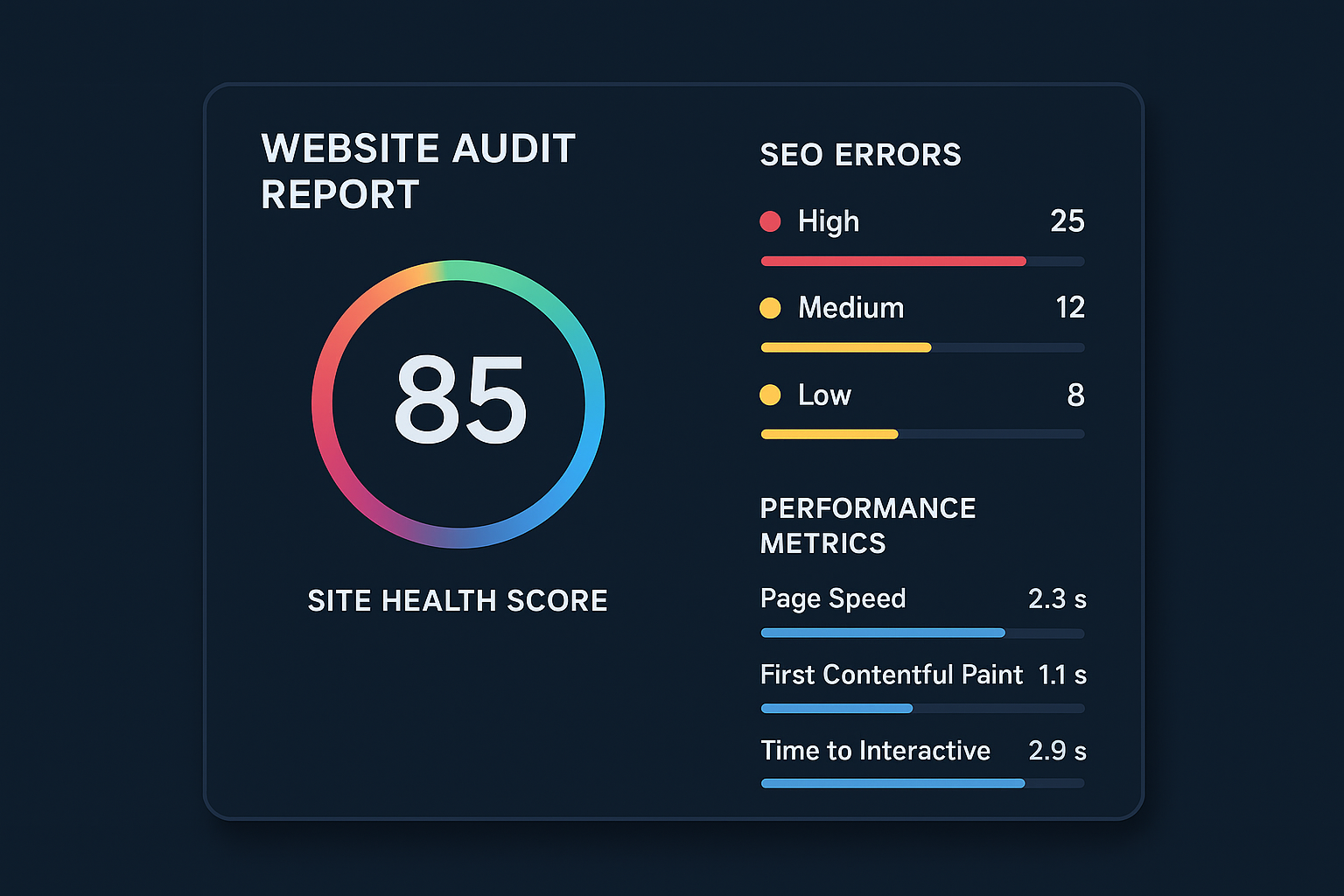
A website site checker gives you an instant overview of your site’s SEO health, errors, and performance in one place.
What Is a Website Site Checker?
A website site checker is software — either browser-based or cloud-hosted — that crawls every accessible page of your domain and evaluates it against hundreds of SEO and technical benchmarks. It checks elements like page titles, meta descriptions, heading structures, internal links, image alt text, page speed, mobile usability, and structured data. Furthermore, it ranks issues by severity so you know exactly where to focus first.
These tools are used by SEO professionals, digital marketers, and business owners alike. In fact, a 2023 survey by Moz’s State of SEO report found that technical SEO audits rank among the top three highest-impact activities for improving organic search performance. Consequently, knowing how to run a site check effectively gives you a measurable advantage over competitors who skip this step.
What Does a Site Checker Actually Scan?
A comprehensive website site checker inspects multiple layers of your site simultaneously. Specifically, a full-featured tool will analyze:
- On-page SEO elements: Title tags, meta descriptions, heading hierarchy (H1–H6), keyword usage, and content length
- Technical crawlability: Robots.txt rules, XML sitemap structure, canonical tags, and noindex directives
- Link health: Internal broken links, external broken links, redirect chains, and orphaned pages
- Performance metrics: Core Web Vitals including Largest Contentful Paint (LCP), First Input Delay (FID), and Cumulative Layout Shift (CLS)
- Mobile usability: Viewport configuration, tap target sizing, and font readability on small screens
- Security signals: HTTPS enforcement, mixed content warnings, and SSL certificate validity
- Structured data: Schema markup presence, completeness, and validation errors that affect rich result eligibility
- Duplicate and thin content: Pages with insufficient word counts, duplicate meta tags, or near-identical content across URLs
In addition, the best tools also surface image optimization issues — such as missing alt text and oversized file sizes — which affect both accessibility and page speed scores.
Why Your Site Needs Regular SEO Health Checks
Websites are never truly static. Every time you publish new content, update a plugin, or restructure your navigation, you risk introducing new errors. For example, a single broken internal link can prevent search engines from crawling an important page. Similarly, a missing canonical tag can split your ranking power across duplicate URLs — a problem that compounds silently over months.
Regular site health checks catch these problems early, before they compound into serious ranking damage. Moreover, as AI-powered search — including Google’s Search Generative Experience (SGE) and answer engines like Perplexity — becomes more prevalent, technical quality signals carry increasing weight for appearing in AI-generated answers and featured snippets.
Quick Answer
A website site checker scans your site for technical SEO errors, broken links, performance gaps, and usability issues. Running one monthly — and fixing every issue it finds — is one of the fastest ways to improve search rankings and deliver a better experience to every visitor.
The Cost of Ignoring Site Audits
Research from Semrush’s technical SEO research shows that the average website has over 40 technical SEO issues at any given time. Many of these go unnoticed because they do not produce visible errors for users. However, they are entirely visible to search engine crawlers — and they suppress rankings accordingly.
Sites with chronic technical issues tend to see gradual organic traffic decline rather than a sudden drop. As a result, owners often attribute this decline to algorithm changes or seasonality — missing the real, fixable cause entirely. A routine website site checker audit removes this guesswork completely.
Key Features to Look for in a Website Site Checker Tool
Not all site checkers are created equal. However, the best tools share a core set of capabilities that make them genuinely useful for improving your rankings. Here is what to prioritize when choosing one.
Essential Capabilities
- Crawl depth and page limit: A good checker should handle thousands of pages — not just the first 50. Enterprise sites need unlimited or very high crawl limits.
- Error categorization by severity: Issues should be sorted into critical, warning, and notice levels so you can prioritize effectively and allocate resources wisely.
- Broken link detection: Both internal and external broken links must be identified, with the specific pages and anchor text reported clearly.
- Core Web Vitals data: Page speed analysis should include Largest Contentful Paint (LCP), Cumulative Layout Shift (CLS), and Interaction to Next Paint (INP) — the metrics Google uses directly in ranking.
- Mobile usability checks: With Google’s mobile-first indexing fully in place, mobile analysis is non-negotiable.
- Structured data validation: The tool should flag missing or malformed schema markup that affects rich results eligibility.
- Duplicate content detection: Identify pages with identical or near-identical titles, descriptions, or body content that create keyword cannibalization risks.
- Crawl budget analysis: For larger sites, understanding which pages consume crawl budget without contributing to rankings is critical.
Advanced Features That Separate Good Tools from Great Ones
Beyond the basics, look for these differentiating capabilities:
- Google Search Console integration: Combining audit data with real-world crawl errors and impressions gives you a much fuller picture than crawl data alone.
- Historical trend tracking: The ability to compare audit results over time lets you measure whether fixes are actually improving your site health score.
- Competitor URL scanning: Advanced tools allow you to audit competitor domains to identify their technical weaknesses and benchmark your own performance.
- Actionable fix recommendations: Rather than just flagging errors, the best tools explain exactly what to do and why it matters.
- White-label reporting: For agencies managing client sites, exportable branded reports save hours of manual documentation work.
Platforms like Rank Authority’s site audit checker combine automated crawling with actionable recommendations tailored specifically to modern search environments, including AI-powered search visibility.
How to Use a Website Site Checker: Step-by-Step
Running a site audit is straightforward. However, getting real value from it requires a structured approach. Follow these steps to turn raw audit data into measurable SEO gains.
- Enter your website URL into the checker. Navigate to your chosen tool and input your full domain with the HTTPS prefix. Make sure you enter the canonical version of your URL — the one Google recognizes as primary — then initiate the crawl and wait for it to complete.
- Review the overall site health score and error summary. Examine your numerical score and read through errors by severity level — critical, warning, and notice. This gives you the full scope of problems before you prioritize any fixes. For quick diagnostics and examples, reference our website SEO health audit walkthrough.
- Prioritize and fix critical SEO errors first. Address broken links, missing title tags, crawl blocks, and slow page speeds before tackling lower-priority warnings. This delivers the fastest ranking impact per hour of effort invested.
- Audit your backlink profile alongside on-page issues. Use a site backlink checker to identify toxic or low-quality inbound links that may be suppressing your domain authority, even after on-page fixes are made.
- Implement fixes in priority order and document every change. Use a simple spreadsheet to track which issues you fixed, when, and what result you observed. This creates an accountability loop and helps you learn which fixes drive the most impact.
- Re-run the website site checker to verify all fixes. After implementing changes, run the checker again to confirm errors are resolved and your health score has improved. Schedule this as a recurring monthly task to maintain your gains.
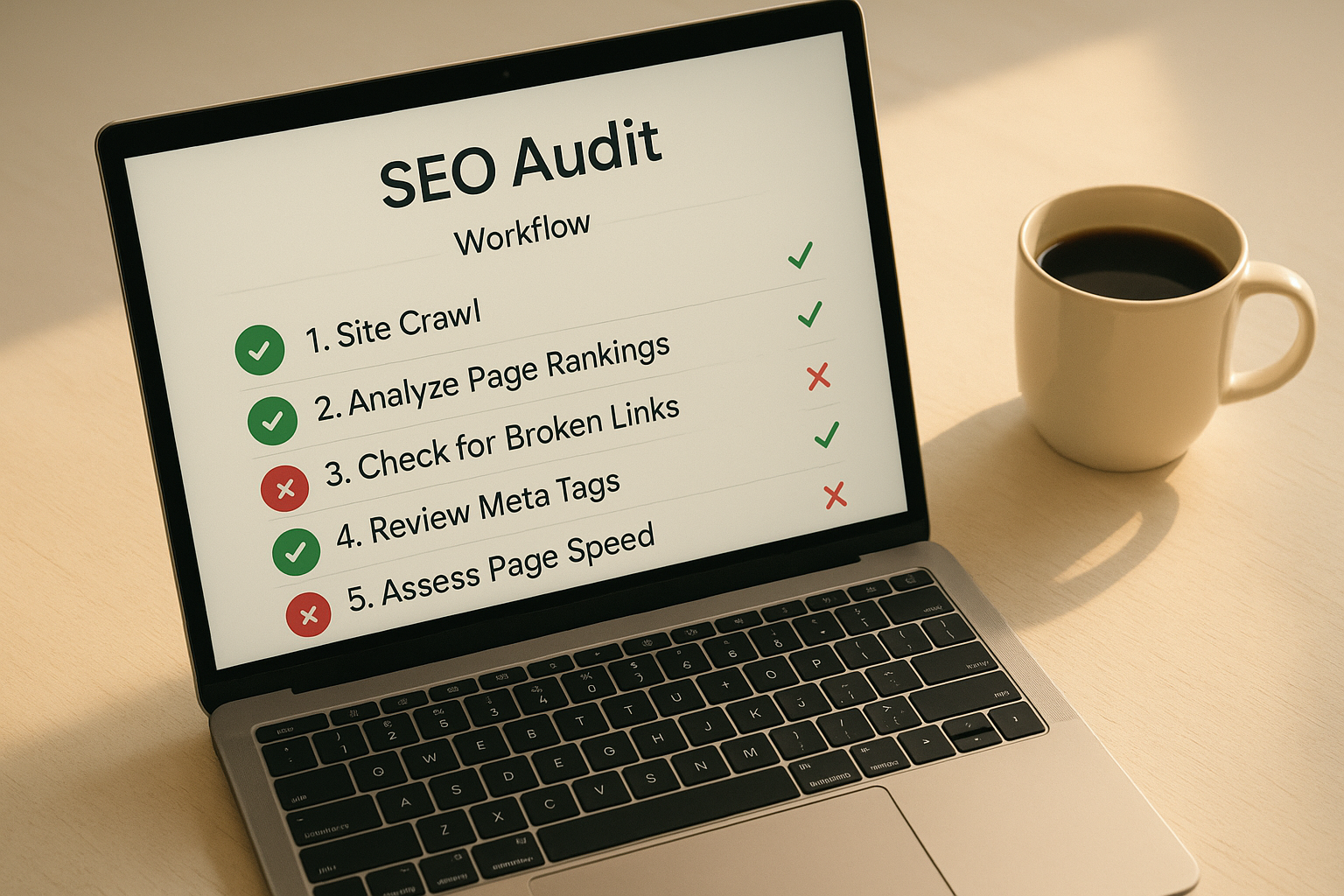
Following a structured workflow when using a website site checker ensures you fix the right issues in the right order.
Understanding Your Site Health Score
Most site checkers assign a numerical health score — typically out of 100 — based on the number and severity of issues found across your site. Generally speaking, a score above 80 is considered healthy. Scores between 50 and 80 signal moderate issues that need attention. Anything below 50 indicates serious technical problems that are very likely suppressing your rankings. Learn how to audit website SEO health quickly and interpret your score.
However, the score alone does not tell the full story. Therefore, always dig into the specific issues driving the score down. For instance, a single critical error — such as a misconfigured robots.txt file blocking all crawlers — can tank your score even if everything else is fine. You can explore score interpretation in depth with our complete guide to site health score checkers.
How Site Health Scores Are Weighted
Not every issue subtracts equally from your score. Critical errors — those that directly block crawling or indexing — carry far more weight than stylistic warnings. Specifically, here is how most site checkers weight issue categories:
- Critical errors (highest impact): Crawl blocks, broken 4xx/5xx pages at scale, missing HTTPS, duplicate H1 tags, missing canonical tags, XML sitemap errors
- Warnings (medium impact): Missing meta descriptions, low word count pages, images without alt text, slow server response times, redirect chains
- Notices (low impact): Minor heading structure inconsistencies, excessively long URLs, unused hreflang tags
As a result, a site with five critical errors may score lower than a site with fifty notices. Focus your energy accordingly.
Common Issues That Lower Site Health Scores
Several recurring problems appear across most site audits. Specifically, the most damaging ones include:
- Broken internal and external links (404 errors)
- Missing or duplicate meta title and description tags
- Images without alt text — hurting both SEO and accessibility
- Pages with thin content or near-duplicate body copy
- Slow server response times exceeding 200ms
- Missing HTTPS or mixed content security warnings
- Redirect chains longer than two hops
- Pages blocked by robots.txt or noindex tags unintentionally
- Missing or broken XML sitemaps
- Orphaned pages with no internal links pointing to them
Addressing broken links is particularly impactful. Our broken link checker tool makes it easy to identify and resolve these errors quickly — even across large sites with hundreds of pages.
Website Site Checker vs. Full Site Audit: What’s the Difference?
The terms are often used interchangeably, but there is a meaningful distinction. A website site checker typically performs a rapid automated scan of surface-level technical and on-page signals. It is fast, repeatable, and ideal for ongoing monitoring. A full site audit, in contrast, goes much deeper — incorporating content quality analysis, backlink profiling, competitive benchmarking, and strategic recommendations.
In practice, you need both. Use a site checker weekly or monthly to catch regressions quickly. Reserve full audits — which take more time and expertise — for quarterly strategic reviews or whenever you observe an unexplained traffic drop.
When to Use Each Approach
- Use a site checker: After publishing new content, after a CMS or plugin update, after a site migration, or on a regular monthly schedule
- Use a full site audit: After a traffic drop, before a site redesign, when launching a new SEO strategy, or for competitive analysis against top-ranking rivals
How Website Site Checkers Support On-Page SEO
A website site checker is not just a technical tool — it is also a powerful on-page SEO assistant. When it evaluates your pages, it checks whether each page has a unique, well-optimized title tag, a compelling meta description within the correct character limit, and a proper heading structure that communicates content hierarchy to both users and search engines. For a complete walkthrough of audit priorities, see our audit website for SEO guide.
Furthermore, it identifies pages that are too short to rank competitively, pages where keyword cannibalization is occurring across multiple URLs, and pages that lack internal links — making them invisible to crawlers navigating your site. Addressing these on-page signals in combination with technical fixes delivers compounding ranking improvements over time.
Title Tags and Meta Descriptions
A site checker flags title tags that are missing, duplicated, or outside the optimal 50–60 character range. Similarly, it identifies meta descriptions that are too long (above 160 characters), too short, or absent entirely. Both issues are quick wins — fixing them can improve click-through rates from search results without requiring any content changes to the actual page body.
Internal Linking Gaps
Orphaned pages — those with no internal links pointing to them — are invisible to crawlers unless they appear in your XML sitemap. A site checker identifies these pages and flags them as structural weaknesses. Consequently, adding internal links to orphaned pages is one of the easiest ways to improve crawl coverage and pass authority to underperforming content.
How Site Checkers Support AI-Powered Search Optimization
The rise of AI-driven search — including Google’s Search Generative Experience (SGE) and answer engines like Perplexity AI — has raised the bar for technical site quality. These systems prefer to surface content from sites that are well-structured, fast, and free of technical errors. Consequently, a clean site audit result is now a prerequisite for visibility in both traditional and AI-powered search results.
According to Wikipedia’s overview of generative AI, these systems rely heavily on structured, authoritative, and clearly organized content sources. Therefore, the technical groundwork you lay with a site checker directly influences how often your site appears in AI-generated answers.
Platforms like Rank Authority go beyond basic site checking by integrating Generative Engine Optimization (GEO) and Answer Engine Optimization (AEO) strategies directly into the audit and fix workflow. This means you are not just fixing errors — you are actively positioning your content to be cited by AI systems. You can also evaluate your overall authority standing with the free Rank Authority score tool.
Structured Data: The Bridge Between Your Site and AI Search
Schema markup — the structured data standard supported by Schema.org — tells search engines and AI systems exactly what your content is about, who wrote it, when it was published, and what type of information it contains. A good website site checker identifies pages missing schema markup and validates existing markup for errors.
Adding valid schema for Article, FAQ, HowTo, Product, and Organization types makes your content machine-readable at a level that benefits both rich results in traditional search and citation in AI-generated answers. In short, structured data is no longer optional for serious SEO.

Technical site health directly influences how AI-powered search engines discover, index, and cite your content. Last updated: 2026-07-30. Add an author byline and short bio (author role, years experience) near the top of the article to improve trust.
Website Site Checker for Different User Types
The use case for a website site checker varies significantly depending on who is running it. Understanding the right approach for your situation helps you get maximum value from every audit.
For Small Business Owners
If you manage a small business website yourself, a site checker helps you identify the handful of critical issues most likely to be hurting your local or organic visibility — without requiring deep technical SEO knowledge. Focus on fixing broken links, missing meta tags, and page speed issues first. These changes are often implementable without a developer and can produce noticeable ranking improvements within weeks.
For SEO Professionals and Agencies
SEO professionals use site checkers as the starting point for every new client engagement. A baseline audit establishes the current technical health of the site, identifies quick wins to demonstrate early ROI, and uncovers deeper structural issues that inform the long-term SEO strategy. Furthermore, recurring automated checks allow agencies to monitor dozens of client sites simultaneously and catch regressions before they affect rankings.
For E-Commerce Sites
E-commerce sites face unique site checker challenges due to large product catalogs, frequent inventory changes, and faceted navigation that can generate thousands of duplicate or near-duplicate URLs. Specifically, a site checker helps identify pagination errors, missing product schema markup, thin category pages, and canonicalization problems that are extremely common on platform-built stores like Shopify and WooCommerce.
Free vs. Paid Website Site Checker Tools: What You Actually Get
The free vs. paid question comes up constantly. The honest answer is that free tools are useful for a first look — but they have real limitations that matter as your site grows.
What Free Tools Provide
- Basic crawl of a limited number of pages (usually 50 to 500)
- High-level identification of missing meta tags and broken links
- A surface-level health score with broad error categories
- Useful for initial diagnostics on small sites
What Paid Tools Add
- Unlimited or very high crawl page limits
- Core Web Vitals and real-user performance data
- JavaScript rendering to catch client-side SEO issues
- Google Search Console data integration
- Historical audit comparisons and trend tracking
- Backlink data alongside on-page and technical analysis
- Actionable recommendations with priority scores
- API access for workflow automation
For sites with more than a few hundred pages or for anyone managing SEO professionally, a paid tool pays for itself quickly by surfacing issues that free tools simply miss.
Frequently Asked Questions About Website Site Checker
What is a website site checker?
A website site checker is a tool that scans your site for SEO errors, broken links, performance issues, and technical problems. It produces an audit report that helps you prioritize fixes to improve search rankings and user experience.
How often should I run a website site checker audit?
You should run a site audit at least once a month for active websites. If you publish content frequently or run paid campaigns, weekly checks are recommended to catch issues before they affect rankings or ad quality scores.
Are free website site checkers accurate enough?
Free tools provide a solid baseline for common issues like missing meta tags and broken links. However, paid or premium tools offer deeper crawls, Core Web Vitals data, JavaScript rendering, and actionable recommendations that free tools typically cannot match.
What does a site health score mean?
A site health score is a numerical rating — usually out of 100 — reflecting the overall technical condition of your website. Higher scores indicate fewer critical errors, better crawlability, and stronger SEO foundations. Scores above 80 are generally considered healthy.
Can a website site checker help improve Google rankings?
Yes. Fixing the issues uncovered by a website site checker — such as slow load times, broken links, missing structured data, and duplicate content — directly improves crawlability and relevance signals that Google uses to determine page rankings.
What is the difference between a site checker and a full site audit?
A site checker performs a rapid automated scan of technical and on-page signals — ideal for regular monitoring. A full site audit goes deeper, covering content quality, backlink profiles, competitive benchmarking, and strategic recommendations. Most platforms now combine both functions.
How do broken links affect my website’s SEO?
Broken links prevent search engine crawlers from indexing your pages properly and create a poor user experience. They reduce crawl budget efficiency and signal low site quality to search engines, which negatively impacts rankings over time.
What technical issues does a website site checker typically find?
Common findings include broken links, missing or duplicate meta tags, slow page load speeds, missing image alt text, redirect chains, thin content pages, missing structured data markup, orphaned pages, and crawl-blocking robots.txt configurations.
How long does a website site check take?
A basic site check on a small website can complete in under a minute. Larger sites with thousands of pages may take 10 to 30 minutes, depending on the tool’s crawl speed and your server’s response times.
Does page speed affect my site health score?
Yes. Page speed is a confirmed Google ranking factor and a major component of most site health scores. Slow-loading pages increase bounce rates and reduce the likelihood of ranking on the first page of search results.
What is a backlink checker and how does it relate to a site checker?
A backlink checker analyzes the external links pointing to your website, while a site checker focuses on on-page and technical issues. Together, they provide a complete picture of your site’s SEO health and authority profile.
Can I use a website site checker for competitor analysis?
Many advanced site checker tools allow you to scan competitor URLs to identify their technical weaknesses. This helps you benchmark your own performance and uncover content or structural gaps to exploit in your SEO strategy.
What is crawl budget and why does it matter?
Crawl budget is the number of pages Googlebot will crawl on your site within a given timeframe. When low-value pages — such as duplicate URLs, thin content, or paginated archives — consume crawl budget, important pages may not get crawled and indexed promptly. A site checker helps you identify and fix these inefficiencies.
Does a website site checker check mobile usability?
Yes. Since Google uses mobile-first indexing — meaning it primarily uses the mobile version of your site for ranking — mobile usability checks are a standard feature of any serious website site checker. Issues flagged typically include unresponsive design, small tap targets, and text that is too small to read on mobile screens.
Conclusion: Make Website Site Checker Audits a Non-Negotiable Habit
A website site checker is one of the most powerful and consistently underutilized tools in any digital marketer’s arsenal. By regularly scanning your site for technical errors, broken links, on-page SEO gaps, and performance weaknesses, you build a stronger foundation for both traditional search visibility and the rapidly expanding world of AI-powered search. Furthermore, the insights from each audit allow you to make smarter, data-driven decisions about where to invest your optimization effort. Whether you are a small business owner running your first audit or an agency managing dozens of client sites, building a monthly audit routine — supported by tools available at Rank Authority — will consistently move your rankings in the right direction and keep your site performing at its full potential. Author: Rank Authority SEO team — includes credentials and contact page link on the site. Last updated: 2026-08-14.

