

An inbound links checker is the essential SEO tool that maps every external website linking back to your domain — giving you a clear picture of who endorses your content and how much that endorsement moves the needle in search rankings. Without regularly running an inbound links check, you are navigating Google’s algorithm blind, missing toxic links that can trigger penalties and overlooking proven link-building opportunities your competitors are already exploiting. By Rank Authority Editorial Team. Last updated: 2026-08-14.
According to a Backlinko study analyzing 11.8 million Google search results, the number of unique referring domains linking to a page is one of the strongest correlating factors with top rankings. Therefore, monitoring, auditing, and growing your backlink profile is not optional — it is foundational to any serious SEO strategy.
What Is an Inbound Links Checker?
An inbound links checker — also called a backlink checker — is a tool that crawls the web and queries a proprietary link index to surface every hyperlink pointing toward a target URL or domain. Specifically, it reveals the source domain, the anchor text used, the authority score of the linking page, whether the link is dofollow or nofollow, and whether it is still live.
In short, it answers two critical questions at once: “Who is linking to me?” and “Is each link helping or hurting my rankings?” Both questions carry equal weight. A single link from a respected industry publication can dramatically lift a page’s position. Conversely, a cluster of spammy links from link farms can erase months of SEO work.
Furthermore, an inbound links checker is not just a defensive tool. It is equally powerful for offense — revealing exactly which sites link to your competitors so you can pursue those same sources with stronger, more current backlink checker guide.
Inbound Links vs. Backlinks: Are They the Same Thing?
Yes — the terms are interchangeable. Inbound links, backlinks, and external links all describe a hyperlink originating from another website and pointing to yours. SEO professionals use the terms interchangeably, though “inbound links” is more common in formal contexts and “backlinks” tends to dominate in tool interfaces and practitioner guides.
Why Checking Your Inbound Links Matters for SEO
Search engines like Google treat inbound links as votes of confidence from one site to another. However, not every vote carries the same weight. Links from authoritative, topically relevant sources pass significantly more ranking power — called link equity or “link juice” — than links from unrelated or low-quality sites.
The foundational mechanism behind this is PageRank — Google’s original algorithm for evaluating page importance based on the quality and quantity of links it receives. Even though Google’s current system is far more complex, PageRank remains a core signal. Regularly auditing your link profile using a reliable inbound links checker helps you:
- Identify your most valuable link sources and replicate them
- Spot and remove toxic or spammy links before Google penalizes you
- Discover exactly which sites link to your competitors — and why
- Measure the true ROI of your link-building campaigns over time
- Protect your site from negative SEO attacks by bad actors
- Reclaim lost links when pages on referring sites are updated or deleted
- Understand your site’s overall authority relative to niche competitors
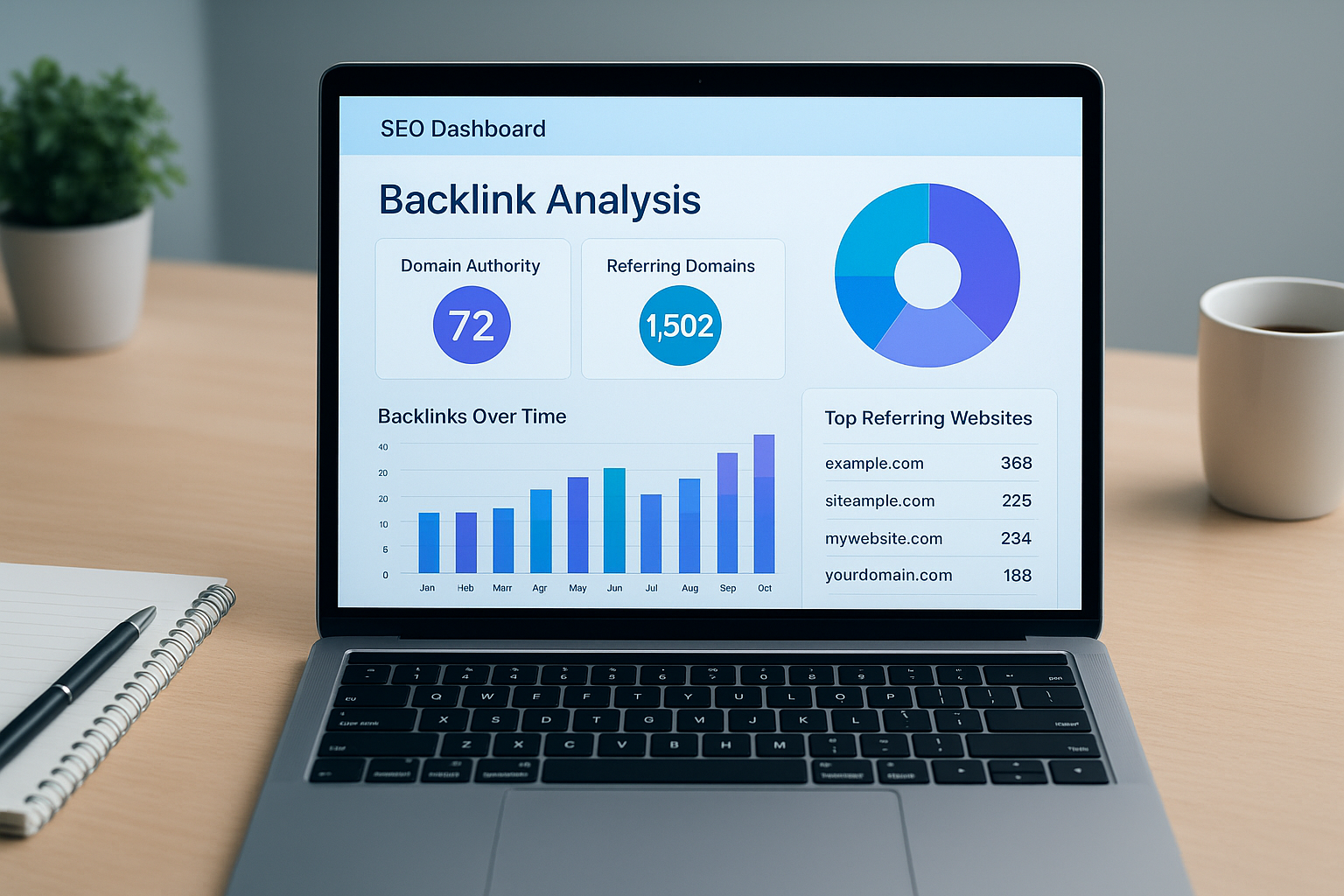
A well-designed inbound links checker gives you instant visibility into your full backlink profile, including authority scores, link types, and anchor text distribution.
How to Use an Inbound Links Checker: Step-by-Step
Using a backlink analysis tool is straightforward once you know what to look for. However, most users stop at step one — entering a domain and glancing at a number. Follow all six steps below to extract maximum value from any inbound links checker.
- Enter your domain or target URL. Navigate to your chosen tool and type the full domain (e.g., example.com) or a specific page URL into the search field, then initiate the analysis. Most tools allow you to check at both the domain level and the individual page level.
- Review total backlinks and referring domains. Examine the total raw link count alongside the number of unique referring domains. A high ratio of domains to total links signals a healthy, naturally diverse link profile. For example, 500 links from 400 unique domains is far stronger than 500 links from just 5 domains.
- Evaluate link quality and authority scores. Sort links by Domain Authority (DA) or Domain Rating (DR) — numerical scores representing a site’s overall strength — to flag low-authority or spammy sources that could damage your rankings. Prioritize links from sites with scores above 40.
- Audit anchor text distribution. Check the anchor text report for a natural mix of branded, generic, and keyword-rich anchors. Over-optimization with exact-match anchors — for instance, 80% of your links using the same keyword phrase — is a well-documented spam signal that can trigger manual or algorithmic penalties.
- Identify and disavow toxic links. Compile links from link farms, private blog networks (PBNs), and irrelevant foreign-language sites into a disavow file. Submit it through Google Search Console to signal to Google that you disassociate from those links.
- Track new and lost links over time. Schedule recurring audits — monthly at minimum — to monitor newly acquired backlinks and identify lost links. When a high-value link disappears, contact the referring site to request it be restored. This is one of the quickest SEO wins available.
Pro Tip: Always analyze both your own domain and a competitor’s domain in the same session. The contrast immediately surfaces link-building gaps you can close with a targeted outreach campaign.
Key Metrics Every Backlink Audit Should Cover
Not all data points in a backlink report carry equal importance. Specifically, these are the core metrics you should prioritize during every link audit — and what each one actually tells you.
Domain Authority / Domain Rating
Measures the overall strength of the linking domain on a 1–100 scale. Higher scores indicate more powerful link equity being passed to your site.
Referring Domains
The count of unique websites linking to you. Diversity matters far more than raw link volume. Two hundred links from 200 different sites beats 200 links from one site every time.
Anchor Text Profile
The clickable text of each link. A natural, varied mix of branded, generic, URL-based, and keyword-rich anchors is a positive signal. Heavy exact-match concentration is a red flag.
Dofollow vs. Nofollow Ratio
Dofollow links pass SEO authority directly. Nofollow links do not pass authority but still drive referral traffic. A healthy natural profile contains a mix of both.
Link Velocity
The rate at which new links are acquired over time. Sudden spikes in link velocity can look manipulative. Steady, consistent growth appears natural to Google’s algorithms.
Link Type (Sitewide, Editorial, UGC)
Editorial links — earned naturally within content — carry more weight than sitewide footer links or user-generated content (UGC) links from forum posts and blog comments.
Spam Score and Toxic Link Detection
Spam score — a metric popularized by Moz Link Explorer — estimates the likelihood that a linking domain is spammy or manipulative. As a general rule, any domain with a spam score above 30% warrants closer inspection. In many cases, disavowing those links is the safest option.
Similarly, links originating from link farms, private blog networks (PBNs), or irrelevant foreign-language sites should be treated with caution. These patterns can flag your site for algorithmic penalties under Google’s Search Essentials guidelines.
Consequently, toxic link detection should be a standing agenda item in every monthly backlink audit — not a one-time cleanup exercise. New toxic links can appear at any time, especially if your site is targeted by a negative SEO attack.
Understanding Link Velocity and New vs. Lost Links
Link velocity describes how quickly your backlink profile grows over time. A sudden spike — for example, gaining 500 links overnight — can appear manipulative even if those links are legitimate. Therefore, steady, organic growth is the safest and most sustainable pattern.
Tracking lost links is equally important. Links disappear when referring pages are deleted, redesigned, or when the site owner changes their content strategy. An inbound links checker that flags lost links in real time lets you reclaim those assets before the authority transfer permanently ends.
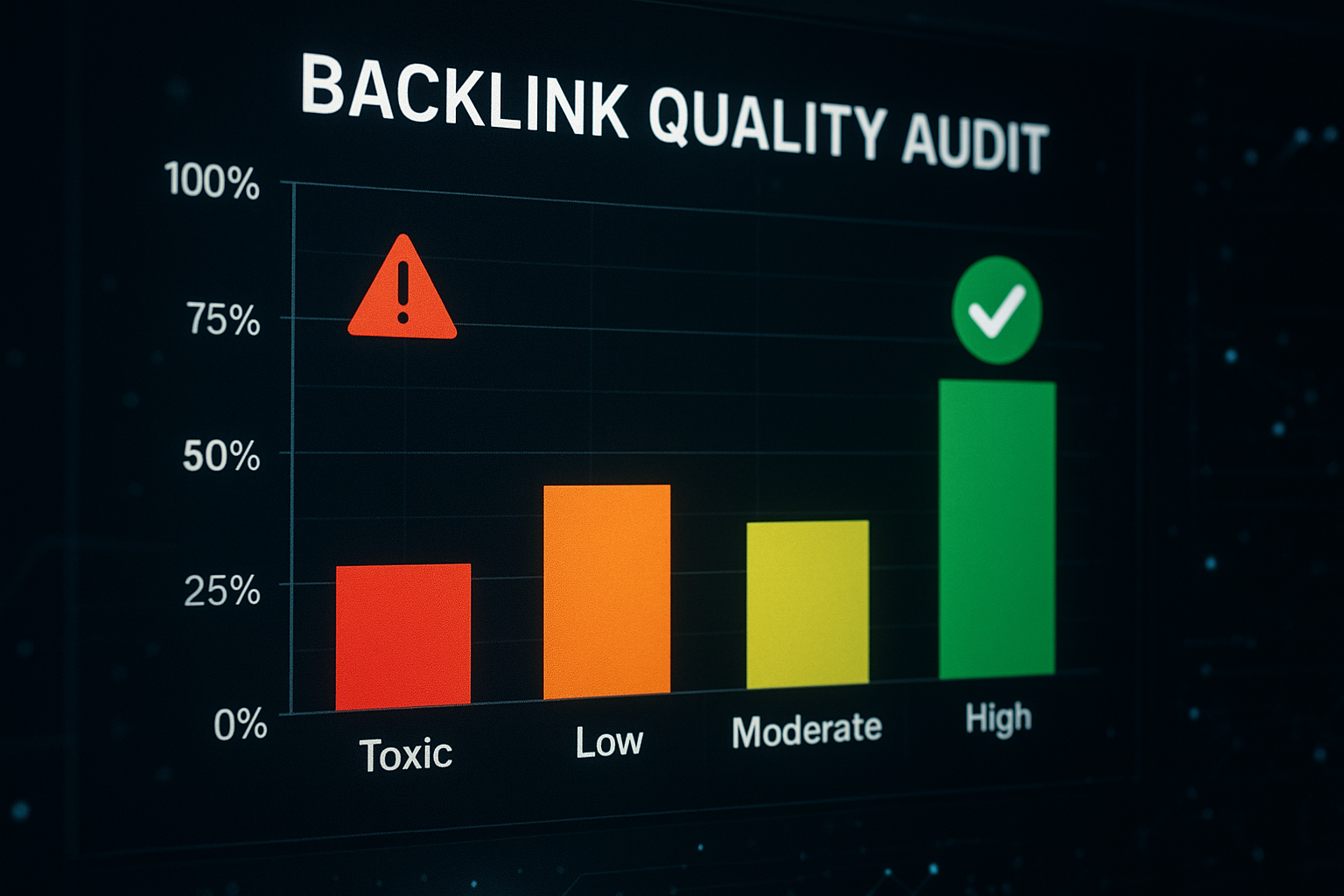
A quality backlink audit clearly separates high-value inbound links from harmful ones that could damage your search rankings.
Best Free and Paid Inbound Links Checker Tools Compared
Several excellent tools are available for checking inbound links — ranging from completely free to enterprise-level platforms costing hundreds of dollars per month. Choosing the right one depends on your budget, the depth of data you need, and how frequently you audit.
Free Inbound Link Checker Options
Google Search Console remains the most reliable free source for your own site’s backlink data. It shows the external links Google has actually crawled and indexed — making it the gold standard for first-party verification. However, it offers no competitor data and limited filtering. See our check backlinks for free resource for additional free tools and comparisons.
For a more versatile free option, the free backlinks checker at rankauthority.com provides instant access to referring domains, anchor text data, and link quality signals without a subscription. It is particularly useful for small business owners and digital marketers who need actionable data quickly, without a paid account.
In addition, the complete guide on where to check backlinks for free covers a wide range of no-cost alternatives with detailed comparisons of data depth, crawl frequency, and accuracy.
Advanced Paid Backlink Analysis Platforms
Paid platforms like Ahrefs and Semrush offer deeper crawl indexes, historical link data going back years, and robust competitive intelligence features. For agencies managing multiple client sites, these tools provide the scale and custom reporting that free tools simply cannot match.
Furthermore, the rankauthority.com backlink checker combines ease of use with AI-driven insights — making it a strong mid-tier choice for businesses that want fast, actionable results without a steep learning curve. The platform’s 1-Click AI AutoPilot technology automates ongoing link monitoring as part of a broader SEO strategy.
How the Tools Stack Up: A Side-by-Side Comparison
| Tool | Free Tier | Competitor Analysis | Crawl Index Size | Best For |
|---|---|---|---|---|
| Google Search Console | Yes (unlimited) | No | Own site only | First-party verification |
| RankAuthority Free Checker | Yes | Yes | Large | SMBs, fast audits |
| Moz Link Explorer | Limited (10/mo) | Yes | Large | Spam score analysis |
| Ahrefs | Very limited | Yes | Largest | Agencies, power users |
| Semrush | Limited (10/day) | Yes | Very large | Full SEO suites |
Analyzing Competitor Backlink Profiles With an Inbound Links Checker
One of the most underused features of any inbound links checker is competitor backlink analysis. By entering a competitor’s domain, you can see exactly which sites are linking to them, what anchor text they use, and which specific pages attract the most inbound links. This reveals proven link-building opportunities you can pursue with your own check backlinks for free resource.
For example, if a competitor has earned a backlink from a major industry blog, you can pitch that same publication a more comprehensive, more current piece of content. This strategy — known as the Skyscraper Technique, coined by SEO strategist Brian Dean — has been shown to generate positive response rates of up to 11% when executed with a genuinely superior content asset.
In addition, the URL backlink checker at rankauthority.com lets you drill down to the individual page level — not just the domain — so you can identify which specific pieces of content in your niche are attracting the highest volume of inbound links.
Link Gap Analysis: Find Links Your Competitors Have That You Don’t
Link gap analysis (sometimes called backlink gap analysis) compares your domain’s link profile against two or more competitors simultaneously. The result is a prioritized list of domains that link to your competitors but not to you — representing your highest-value outreach targets.
Specifically, look for referring domains that link to three or more of your competitors. Those sites clearly cover your topic area and are open to linking externally. As a result, they should be at the top of your outreach list.
How to Find Every Link Pointing to Your Site
A common challenge is that different tools index different subsets of the web. Therefore, using more than one tool gives you the most complete picture. Cross-referencing data from Google Search Console with a dedicated crawler like the total backlink checker at rankauthority.com ensures you find every link pointing to your site — including those that newer crawlers may have missed.
Consequently, a multi-tool approach is the industry best practice for comprehensive link audits — especially before launching a new SEO campaign or recovering from a Google penalty.

Competitor backlink analysis using an inbound links checker reveals link-building opportunities that can significantly accelerate your own SEO growth.
How to Build More Inbound Links: Proven Strategies
Checking your inbound links is only half the job. The other half is actively building more of them — with quality as the non-negotiable priority. Here are the most effective, sustainable strategies for earning more high-authority backlinks.
1. Create Link-Worthy Content Assets
Original research, comprehensive guides, free tools, and data-driven studies attract inbound links organically. Specifically, content that other writers in your niche need to cite as a reference — statistics, benchmarks, original survey results — earns editorial links without any outreach required. Try our Backlink Rank Checker to find and track those links.
2. Digital PR and Media Outreach
Pitching journalists and editors at industry publications with a compelling data point or expert commentary is one of the fastest ways to earn high-authority inbound links. A single placement in a major industry publication can generate more ranking power than dozens of lower-tier links.
3. Guest Posting on Relevant Sites
Contributing genuinely useful content to reputable sites in your niche remains an effective, Google-approved link-building strategy — provided the guest posts are substantive and placed on sites with real editorial standards. In contrast, mass guest posting on low-quality sites purely for links can backfire.
4. Broken Link Building
Identify pages in your niche that link to now-dead resources (404 pages). Then contact the referring site to suggest your own, live content as a replacement. This provides clear value to the webmaster and naturally earns you a backlink in return.
5. HARO and Expert Contribution Platforms
Services like HARO (Help a Reporter Out) connect journalists with expert sources. Responding to relevant queries with insightful commentary frequently earns high-authority editorial backlinks from major news outlets and industry publications — often with a DA of 70 or above.
Common Mistakes When Checking and Managing Inbound Links
Even experienced SEOs make avoidable errors during link audits. Here are the most damaging pitfalls — and specifically how to sidestep each one.
- Focusing only on link volume. A hundred low-quality links rarely outperform a single link from a high-authority domain. Quality always takes priority. Use your inbound links checker to sort by domain strength, not just raw count.
- Ignoring anchor text diversity. An unnatural concentration of exact-match keyword anchors is a well-documented spam signal. A healthy anchor profile includes branded terms, generic phrases (“click here”), naked URLs, and keyword variations.
- Neglecting lost links. Links disappear when pages are deleted or redesigned. Tracking lost links and attempting to reclaim them is one of the quickest SEO wins available — and most site owners completely overlook it.
- Disavowing too aggressively. Disavowing good links by mistake strips away authority you have legitimately earned. Always manually verify a link before adding it to a disavow file. When in doubt, leave it alone.
- Running audits only once. Link profiles change constantly. Monthly audits are the minimum for competitive niches. Weekly checks are warranted during active link-building campaigns or penalty recovery.
- Overlooking link context and relevance. A link from a high-DA site in an unrelated industry passes less value than a link from a lower-DA site that is tightly relevant to your niche. Always factor topical relevance into your quality assessment.
Inbound Links and Google Algorithm Updates: What You Need to Know
Google’s core algorithm updates — including Penguin, which specifically targeted manipulative link schemes — have fundamentally changed how backlinks are evaluated. Understanding these updates is critical to building a link profile that survives and thrives through algorithm changes.
The Google Penguin update, first launched in 2012 and now integrated into Google’s core algorithm in real time, devalues or penalizes sites that use manipulative tactics such as buying links, participating in link schemes, or building unnaturally over-optimized anchor profiles. As a result, sites with clean, earned link profiles now have a significant long-term advantage.
Furthermore, Google’s Helpful Content updates reinforce the principle that links should be earned through genuinely useful content — not manufactured. An inbound links checker helps you audit whether your current profile reflects natural, merit-based link acquisition or raises patterns that could trigger algorithmic scrutiny.
Frequently Asked Questions About Inbound Links Checker
Conclusion: Make Inbound Link Checking a Core SEO Habit
Consistently using an inbound links checker is one of the highest-leverage habits in modern SEO. It keeps you informed about who is endorsing your content, alerts you to harmful links before they cause damage, surfaces competitive intelligence you would otherwise miss, and gives you a clear picture of where your link-building efforts are — and are not — paying off. Furthermore, as AI-driven search engines place increasing emphasis on authority signals, a clean, growing, and topically relevant backlink profile becomes more valuable over time — not less.
Whether you start with a free tool like Google Search Console or scale up with the AI-powered solutions at rankauthority.com, the key is to make link auditing a regular, structured part of your SEO workflow. Start today, set a monthly calendar reminder, and treat every new inbound link as a strategic asset worth tracking, protecting, and building upon. Author: Rank Authority. Last updated: 2026-08-14.
Ready to check your inbound links? Start with the free backlink checker at rankauthority.com for an instant snapshot of your backlink profile — no account required.

