
The disavow process is a way to disavow toxic links and tell Google to ignore specific backlinks pointing to your website when evaluating your site’s authority and rankings. Although it sounds straightforward, using it incorrectly can do more harm than good. Therefore, understanding exactly when and how to disavow links is essential for any serious SEO strategy. For a deeper walkthrough, see our Entities Checker: The Complete SEO Guide (2024).
Not every backlink is beneficial. In fact, spammy or manipulative links from low-quality sites can trigger manual penalties from Google or suppress your organic rankings. As a result, Google built the Disavow Links tool inside Google Search Console to give site owners a way to distance themselves from harmful links they cannot remove.
What Does Disavow Toxic Links Mean in SEO?
To disavow means to formally declare that you do not endorse a specific backlink and want Google to disregard it during ranking calculations. According to Wikipedia’s overview of search engine optimization, link signals remain one of the most influential ranking factors — which is precisely why toxic links can cause measurable damage. For step-by-step backlink checks, see our check backlinks guide.
In practice, disavowing is not a deletion of the link itself. Instead, it is an instruction file you submit to Google that says, in effect, “Please do not count these links when evaluating my site.” Google then processes that file during its next crawl cycle.
Direct answer: Disavow is the act of submitting a text file to Google Search Console that lists backlinks you want Google to ignore. It protects your site from ranking penalties caused by spammy or manipulative inbound links you cannot manually remove.
Identifying which backlinks to disavow requires a thorough audit of your entire link profile. For a deeper walkthrough, see our SEO Split Test Findings: Do Emojis in Meta Descriptions Enhance or Hinder Your S.
When Should You Actually Use It?
Google itself advises that most sites will never need to use the disavow tool. However, there are two clear situations where it becomes necessary. First, if your site has received a manual action penalty in Google Search Console related to unnatural links. Second, if you have strong evidence that a targeted negative SEO campaign is actively harming your rankings.
Additionally, sites that previously engaged in link schemes — even years ago — may still carry the residual risk of those links. In those cases, cleaning up the link profile through disavowal can be a meaningful part of recovery.
Conversely, using the tool on a healthy site without a clear reason is risky. Because Google already ignores most low-quality links algorithmically, unnecessary disavowal can accidentally remove legitimate link equity and hurt your rankings.
Step-by-Step: How to Disavow Harmful Backlinks
Following a structured process reduces the risk of mistakes when you disavow toxic links. Each step below builds on the previous one, so skipping ahead is not recommended. For a deeper walkthrough, see our Analyzing FAQ Page Structured Data: A guide to Success.
Step 1 — Audit Your Backlink Profile
Start by exporting your full backlink list from Google Search Console. For a more detailed analysis, see our backlink audit guide or use Ahrefs or SEMrush to get spam scores and domain authority metrics. Look specifically for links from link farms, adult content sites, irrelevant foreign-language directories, and pages with no real content.
Step 2 — Attempt Manual Removal First
Before submitting a disavow file, Google recommends contacting webmasters to request link removal. Document every outreach attempt, including dates and responses. If webmasters do not respond within two to four weeks, you have sufficient grounds to proceed with disavowal. For step-by-step reminders, check my backlinks.
Step 3 — Create Your Disavow File
A disavow file is a plain text (.txt) file with one entry per line. Use the format domain:example.com to disavow all links from an entire domain. For individual URLs, simply paste the full URL on its own line. You can also add comment lines starting with # for your own notes.
Step 4 — Submit the File in Google Search Console
Navigate to the Google Disavow Links tool, select your verified property, and upload the file. For guidance on reviewing links beforehand, see how to check backlink profile. Google will confirm receipt immediately, though processing takes additional time. Remember that uploading a new file completely replaces the previous one, so always maintain a master version.
Step 5 — Monitor and Iterate
After submission, monitor your manual actions report and organic ranking trends in Google Search Console. Results can take several weeks to several months. Meanwhile, continue performing regular scan backlinks audits to catch any new toxic links that appear over time.
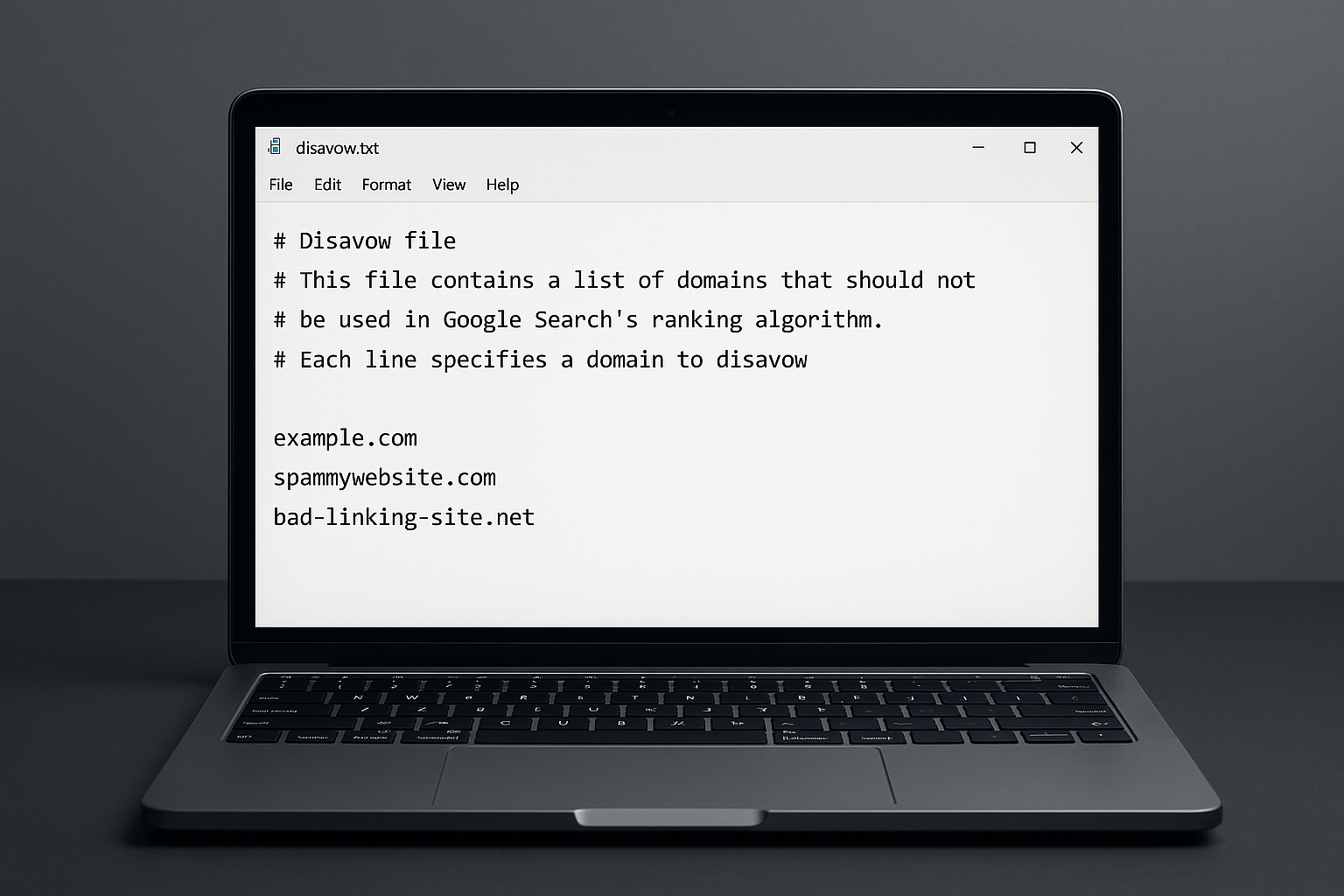
A properly formatted disavow file lists each domain or URL on a separate line, with optional comment lines for organization.
Common Mistakes to Avoid
Even experienced SEOs make avoidable errors with the disavow tool. Understanding these pitfalls upfront saves significant time and protects your rankings. For a deeper walkthrough, see our Duplicate Content and How It Effects Your Rankings!.
Disavowing high-quality links by mistake is the most damaging error. Because a misidentified backlink from an authoritative site can strip away valuable link equity, always cross-check domain authority before including any link in your file. For a deeper walkthrough, see our FAQ Schema Optimization Service: The Complete Guide.
Uploading incomplete files is another frequent issue. Since each new upload replaces the previous submission entirely, forgetting to include previously disavowed links means Google will start counting them again. Therefore, always maintain and update a single master file.
Expecting instant results leads to premature re-submissions. In reality, Google processes disavow files gradually, and ranking changes may not appear for months. Patience is essential during this phase.
How Negative SEO Makes This Tool Necessary
Negative SEO occurs when a competitor deliberately builds thousands of spammy links to your site to trigger a Google penalty. Although Google’s algorithms catch many of these attacks automatically, sophisticated campaigns can still cause harm. As a result, monitoring your backlink profile regularly — especially after ranking drops — is a best practice for competitive industries; see our fix broken links checklist to identify and remediate problematic links.
For expert guidance on building a clean, penalty-resistant link profile, RankAuthority offers comprehensive SEO resources and professional link auditing support that can help you identify risks before they become penalties. Author: RankAuthority SEO team. Last updated: 2026-07-02.
Domain-Level vs. URL-Level Disavowal
Choosing between domain-level and URL-level disavowal depends on the nature of the linking site. If an entire domain is a link farm or spam network, disavowing at the domain level is far more efficient because it covers all current and future links from that source. Learn how to check your backlink profile to determine the right scope.
However, if only one specific page on an otherwise legitimate site contains a harmful link, URL-level disavowal is the safer choice. This approach preserves any positive signals from other pages on that domain while neutralizing the single problematic link.
In most real-world audits, the majority of entries will be domain-level, with a smaller subset of individual URLs. This combination gives you comprehensive coverage without unnecessary risk. Additionally, RankAuthority’s website backlinks analysis resources can help you make this determination systematically.
Conclusion: Use Disavow Strategically, Not Routinely
The disavow tool is a powerful instrument when used correctly, but it is not a routine maintenance task. Reserve it for situations involving manual penalties, confirmed negative SEO attacks, or legacy link schemes. Always audit thoroughly, attempt manual removal first, and maintain a single up-to-date disavow file. Because Google’s algorithms already handle most low-quality links, your goal is to disavow only what poses a genuine, documented threat to your site’s performance.
Frequently Asked Questions
What does disavow mean in SEO?
To disavow a link means to tell Google to ignore specific backlinks when assessing your site’s authority. It is used when harmful or spammy links cannot be removed manually and may be causing ranking problems. For tool-driven remediation, see our backlink analysis tool. For a deeper walkthrough, see our Dead Links Finder: Fix Broken Links Fast (2025 Guide).
When should I use the disavow tool?
Use the disavow tool only when you have a manual penalty from Google or clear evidence that toxic links are hurting your rankings. Casual use on healthy sites is unnecessary and potentially risky.
How do I create a disavow file?
A disavow file is a plain text (.txt) file listing one URL or domain per line. Use domain:example.com to disavow an entire domain or list individual URLs directly.
How long does it take for a disavow to take effect?
Google typically processes a disavow file within a few weeks, but ranking improvements may take several months. The timeline depends on how frequently Google recrawls the linking pages. For a deeper walkthrough, see our Entity Match in SEO: How it works!.
Can disavowing links hurt my site?
Yes, disavowing legitimate backlinks by mistake can remove valuable link equity and harm your rankings. Always audit your link profile carefully before submitting a disavow file.
Should I disavow at the domain or URL level?
Disavowing at the domain level is generally more efficient when an entire site is spammy. Use URL-level disavowal only when a single page on an otherwise legitimate site is problematic.
What tools can I use to find toxic backlinks?
Popular tools for backlink analysis include Google Search Console, Ahrefs, and SEMrush. Each provides a backlink report that you can filter by spam score, domain authority, and anchor text to identify harmful links. For a deeper walkthrough, see our Eliminating Duplicate Title Tags.
Does Google automatically ignore spammy links?
Google’s algorithms are designed to ignore most low-quality links automatically. However, in cases of manual penalties or aggressive negative SEO, submitting a disavow file provides an extra layer of protection. For a deeper walkthrough, see our Duplicate Title Tags SEO: Fix & Prevent Issues.
Do I need to contact webmasters before disavowing?
Google recommends attempting to remove links manually first by contacting webmasters. However, if those attempts fail or go unanswered, you can proceed directly to submitting a disavow file.
Can I update my disavow file after submitting it?
Yes, you can upload a new disavow file at any time to replace the existing one. The new file completely overwrites the previous submission, so always include all URLs and domains you want to disavow.
What is negative SEO and how does disavow help?
Negative SEO is when competitors build spammy links to your site intentionally to damage your rankings. Submitting a disavow file neutralizes these links and signals to Google that you did not create them. For a deeper walkthrough, see our Do Emojis in Meta Descriptions Benefit or Negatively Impact Your SEO?.
Is the disavow tool available for all search engines?
Google and Bing both offer disavow tools. Google’s tool is accessed through Google Search Console, while Bing’s is available in Bing Webmaster Tools.

