
Technical SEO Automation Tool: 2026 Complete Buyer’s Guide, ROI Calculator & Implementation Playbook
Last updated: 2025-07-14 | 18-minute read | Written for SEO leads, engineers, and growth teams | By Rank Authority editorial team
A technical SEO automation tool is your always-on defense system for crawling, auditing, monitoring, and fixing site health — without hours of manual busywork. This guide explains what separates good platforms from great ones, how to compare them honestly, which real tools dominate the market, and how to prove ROI to leadership in weeks, not quarters.

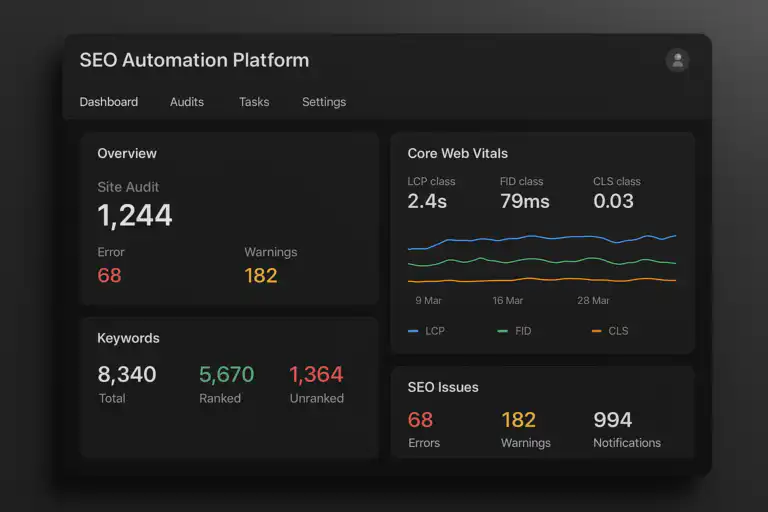
A modern technical SEO automation tool dashboard: real-time audits, Core Web Vitals, and prioritized alerts in one view.
Quick Navigation — At a Glance
- Definition: Software that automates crawling, auditing, monitoring, alerting, and fixing for technical SEO at scale. See the local market perspective in our Local SEO automation software buyer’s guide.
- Why it matters in 2026: Frequent deployments, AI-driven search, and large-scale sites demand continuous — not weekly — oversight.
- Core coverage: Crawlability, indexation, structured data, Core Web Vitals, log analysis, and CI/CD integration.
- Top tools covered: Screaming Frog, Sitebulb, ContentKing, Lumar (DeepCrawl), Botify, SEMrush Site Audit, Ahrefs Site Audit. See our Search Engine Tools guide for international and localized tooling recommendations.
- Outcome: Fewer regressions, faster fixes, measurable ROI, and durable rankings. Editors note: Add contextual inbound links from 2–3 relevant site pages to improve discoverability and internal authority for this guide.
What Is a Technical SEO Automation Tool?
A technical SEO automation tool is software that continuously audits your website for crawl issues, performance regressions, structured data errors, and indexation problems — then notifies your team and, in many cases, applies fixes before traffic is impacted. It transforms technical SEO from a reactive, labor-intensive practice into a proactive, systematized discipline.
“Technical SEO” covers the foundational layer that determines whether search engines can reliably access, interpret, and rank your content. This includes:
- Crawlability: Can Googlebot and other crawlers access your pages without being blocked by robots.txt, noindex tags, or redirect chains?
- Indexation: Are the right pages indexed and the wrong pages excluded?
- Site speed & Core Web Vitals: Do your pages meet LCP, CLS, and INP thresholds across templates and geographies?
- Structured data: Is your JSON-LD valid, complete, and eligible for rich results?
- Server behavior: Are redirect chains, 404s, 500s, and hreflang errors handled correctly?
- Internal architecture: Is link equity flowing efficiently and are canonical signals consistent?
Automation keeps every one of these essentials in check continuously and at scale — something no weekly manual audit can match.
Why Every Modern Team Needs an SEO Automation Platform in 2026
The case for adopting a technical SEO automation platform has never been stronger. Here is why:
1. Release Velocity Has Outpaced Manual Auditing
Enterprise teams ship dozens of deployments each week. Every release carries the risk of a misconfigured robots.txt, a stray noindex tag pushed to production, or a template change that tanks LCP. A weekly crawl catches these errors days — sometimes weeks — after they cause damage. Continuous automation catches them within minutes.
2. AI-Driven Search Rewards Structure and Stability
Google’s AI Overviews, Bing Copilot, and third-party answer engines increasingly pull from pages with consistent, valid structured data, fast server responses, and stable content signals. Missing schema, broken canonical chains, or inconsistent meta tags quietly erode your eligibility for high-value SERP features. Read more on AI search optimization.
3. Scale Makes Manual Oversight Impossible
A site with 100,000+ pages cannot be meaningfully audited by hand. Technical SEO automation tools use smart crawling, template-level monitoring, and log file analysis to surface the highest-priority issues across millions of URLs — without exhausting your team or your servers.
4. Slow SEO Leaks Are Expensive and Silent
A misconfigured canonical or a bloated crawl budget doesn’t cause an immediate traffic cliff — it causes a slow, invisible bleed. By the time you notice in rankings or analytics, you may have lost months of organic performance. Automation detects the signal before the revenue impact becomes irreversible.

Automated crawlers map architecture, surface prioritized issues, and route alerts directly to the right team members.
How Does a Technical SEO Automation Tool Work? (Step-by-Step)
Understanding the internal mechanics helps you evaluate best automation tools more critically and set realistic expectations for your team.
- Crawl Scheduling & Execution: The tool dispatches bots that systematically visit URLs according to a configurable schedule — hourly, daily, or triggered by a deployment event. Smart crawlers prioritize high-value templates (product pages, category pages, editorial content) over low-value URLs (pagination, filters, admin paths).
- Signal Collection: During each crawl, the tool collects HTTP status codes, response headers, canonical tags, meta robots directives, title tags, heading structure, internal link counts, hreflang attributes, and structured data markup. It also records server response times.
- Validation & Comparison: Collected signals are validated against SEO best-practice rules and compared against a previous baseline snapshot. Any change — whether a new 404, a shifted canonical, a missing schema property, or a rising LCP time — is flagged as a delta.
- Prioritization & Routing: Issues are scored by severity (critical, warning, informational) and impact (how many pages are affected, how much traffic is at risk). They are then routed to the correct owner — engineering for server errors, content for metadata regressions, DevOps for infrastructure alerts.
- Alerting & Reporting: Owners receive real-time alerts through Slack, Teams, email, or PagerDuty. Dashboards aggregate issue trends, resolution rates, and coverage over time. See also: real-time SEO alerts.
- CI/CD Integration & Auto-Fix: For mature implementations, the tool integrates with GitHub, GitLab, or Jenkins to run pre-deployment checks. A merge that introduces a noindex to a critical template, or breaks a sitemap, is blocked before it reaches production. Some platforms also offer auto-patching for safe, predictable metadata fields.
For foundational reading on how crawlers interpret access rules, see the MDN overview of the robots.txt standard and our SEO automation software checklist for evaluation criteria.
Key Capabilities to Demand in Any Technical SEO Automation Tool
Not all platforms are created equal. Below is a definitive breakdown of every core capability, what it does, and why it matters — so you can hold any vendor accountable during a demo or trial.
🔍 Smart Crawling & Crawl Budget Management
Prioritizes high-value pages first. Throttles request rates to protect server performance. Allows custom crawl scopes (subdomain, subfolder, template type). Respects robots.txt while also auditing it for misconfiguration. Essential for large sites where naive crawling wastes crawl budget on thin pages.
📸 Change Detection & Snapshot Comparison
Compares the current crawl against a stored baseline to detect changes in title tags, meta descriptions, canonical targets, H1s, structured data, and internal link counts. Catches unintentional regressions introduced by CMS updates, template rollouts, or developer commits.
🧩 Structured Data Validation & Rich Result Testing
Parses and validates JSON-LD, Microdata, and RDFa markup against Schema.org vocabulary. Flags missing required properties, incorrect types, or nesting errors. Cross-references with Google’s Rich Result eligibility rules so you know exactly which enhancements are at risk.
⚡ Core Web Vitals Monitoring by Template
Tracks LCP (Largest Contentful Paint), CLS (Cumulative Layout Shift), and INP (Interaction to Next Paint) broken down by page template, device type, and geography. Segmenting by template is critical — a single CLS regression in your product template affects thousands of URLs simultaneously.
🗂️ Indexation Control & Canonical Integrity
Detects stray noindex tags, rogue canonical targets, canonical chains longer than one hop, self-referencing canonicals on paginated pages, and mismatched hreflang/canonical combinations. These subtle errors quietly drain indexation of high-value pages.
📋 Log File Analysis & Crawl Budget Insight
Ingests server log files to reveal which URLs Googlebot actually visits, how often, and in what order. Identifies crawl budget waste on URLs that should be blocked or deprioritized. Confirms whether your most important pages receive crawl frequency proportional to their update frequency.
🚨 Real-Time Alerting with Severity Routing
Fires alerts the moment a critical threshold is crossed — not in the next weekly report. Routes alerts to the correct owner based on issue type, affected template, or subdirectory. Tunable severity thresholds prevent alert fatigue from low-priority noise overwhelming high-priority signals.
🔗 CI/CD Pipeline Guards
Integrates with GitHub Actions, GitLab CI, Jenkins, or similar. Runs SEO checks as part of the pull request review process and blocks merges when critical thresholds fail. Prevents regressions from ever reaching production — the highest-leverage capability for engineering-led organizations.
🌐 International SEO & Hreflang Monitoring
Validates hreflang annotations for correctness, completeness, and reciprocity. Flags missing return links, incorrect language codes, and URLs in hreflang clusters that return non-200 status codes. Critical for multinational sites where hreflang errors cause significant geo-targeting failures.
Top Technical SEO Automation Tools Compared (2026)
Below is an honest, detailed comparison of the leading platforms. Each has distinct strengths and genuine trade-offs. Match the tool to your team’s size, technical maturity, and use case — not to whichever has the best marketing. See our best automation tools guide for a complete vendor comparison.
Pricing approximate as of 2025. Verify directly with vendors before purchasing. For a compact vendor checklist, see our best automation tools guide.
Screaming Frog: Deep Dive (Most Searched Tool)
Screaming Frog SEO Spider remains the most widely used technical SEO automation tool in the market — and for good reason. Here is an honest breakdown of everything it does and where it falls short.
What Screaming Frog Does Exceptionally Well
- Comprehensive on-page crawl data: Extracts titles, meta descriptions, H1s, H2s, canonical tags, noindex, hreflang, Open Graph, structured data, and more from every URL.
- Custom extraction: Uses XPath, CSS selectors, and regex to pull any data point from the HTML of any page — essential for custom audits.
- JavaScript rendering: Integrates with a headless Chrome instance to render JavaScript-heavy pages and audit the DOM as seen by Googlebot.
- API integrations: Connects to Google Analytics, Google Search Console, PageSpeed Insights, and Majestic for enriched crawl data.
- Free tier: Crawls up to 500 URLs completely free — a genuine entry point for small sites or quick spot checks.
Where Screaming Frog Falls Short
- No continuous, automated monitoring — crawls are initiated manually or via scheduled command-line tasks.
- Desktop-based (Windows, Mac, Linux) — not a cloud SaaS; results are stored locally or exported.
- No native CI/CD integration — requires custom scripting to embed in deployment pipelines.
- No built-in alerting — you must run the crawl, review results, and identify changes manually.
Verdict: Screaming Frog is the gold standard for deep, structured, on-demand auditing. Pair it with a continuous monitoring tool (ContentKing, Lumar) for complete coverage.
How to Choose the Right Technical SEO Automation Tool for Your Team
The right tool is not the one with the longest feature list — it is the one your team will actually use consistently. Follow this decision framework:
Step 1: Define Your Primary Use Case
Are you primarily running one-off deep audits (Screaming Frog, Sitebulb), continuous site monitoring (ContentKing, Lumar), enterprise-scale crawl budget optimization (Botify), or integrated SEO-plus-keyword management (SEMrush, Ahrefs)? The answer determines which category of tool to prioritize. For analytics-driven evaluation, see our AI-driven SEO analytics guide.
Step 2: Map Your Workflow and Stakeholders
List who triages issues (SEO lead), who fixes them (engineering or content), and how success is measured (issues prevented, time to resolve, sessions protected). The tool must fit these workflows — not force you to create new ones.
Step 3: Score Against Non-Negotiable Integrations
Confirm compatibility with: your analytics platform (GA4, Adobe Analytics), your version control system (GitHub, GitLab, Bitbucket), your chat or incident tools (Slack, PagerDuty), and your data warehouse (BigQuery, Snowflake).
Step 4: Evaluate Alert Quality, Not Quantity
During any trial, measure signal-to-noise ratio: what percentage of alerts require action versus what percentage are noise? Also measure mean time to detect (MTTD): how quickly does the tool fire an alert after an issue is introduced? Slow or noisy alerting destroys adoption.
Step 5: Run a 30-Day Pilot with Defined Success Metrics
Before committing to a contract, run a structured SEO optimization software trial. Define three success metrics in advance: (1) number of critical issues detected, (2) mean time to resolve, and (3) team adoption rate (how often does the tool get checked without prompting?). A tool that scores well on all three is worth buying.

Feature comparison cards help isolate the capabilities that matter most for your use case and team size.
Pros and Cons of SEO Automation Platforms
Every platform makes trade-offs. This expanded view covers both the standard benefits and the realistic limitations that vendors rarely advertise.
Technical SEO Automation Tool ROI: How to Calculate and Prove It
Leadership does not buy “fewer errors.” They buy revenue protected and cost avoided. Here is a practical ROI framework you can use in any budget conversation. For focused investment analysis see our automated SEO investment analysis.
Metric 1: Issues Prevented Pre-Release
Track the number of critical SEO errors caught by CI/CD checks before they reached production. Assign a conservative traffic-at-risk value to each: if a noindex on your product template would have affected 50,000 pages generating $2,000/day in attributed revenue, that single prevention event has a automated SEO investment value.
Metric 2: Mean Time to Detect vs. Mean Time to Resolve
Baseline these two metrics before implementing the tool. Compare monthly. Reducing MTTD from 14 days (weekly manual crawl + review lag) to 15 minutes (real-time alert) means you recover 13+ days of potential traffic loss per incident.
Metric 3: Engineering & SEO Time Saved
Estimate the hours your team previously spent on manual audits, error discovery, and reporting. A conservative estimate of 10 hours/week at a blended rate of $75/hr yields $39,000/year in recoverable labor cost — often exceeding the tool’s annual license fee.
Metric 4: Sessions and Revenue Protected
Model the sessions that would have been lost if a detected issue had persisted through a full ranking cycle. Use Google Search Console CTR for affected queries multiplied by your site’s revenue per session to arrive at a conservative protection value.
Implementing Your Technical SEO Automation Tool: 5-Phase Rollout
Successful implementation is about phased adoption — not switching everything on at once and drowning your team in AI-driven SEO analytics alerts.
- Phase 1 — Observe (Days 1–7): Connect your domain. Run a full baseline crawl. Document current state: number of crawl errors, indexation issues, schema warnings, and Core Web Vitals scores. This baseline is the foundation of every future ROI conversation.
- Phase 2 — Alert (Days 8–21): Enable your five highest-impact alert rules only. Recommended starting set: noindex on money pages, critical crawl errors (5xx), canonical chain loops, sitemap anomalies, and LCP regression above 10%. Tune thresholds for two weeks before adding more rules.
- Phase 3 — Guard (Days 22–35): Add CI/CD checks to your deployment pipeline. Start with three non-negotiable rules: no noindex added to critical templates, no robots.txt disallow added to priority paths, no removal of canonical tags on canonical source pages. These alone prevent the most common and costly deployment mistakes.
- Phase 4 — Automate Fixes (Month 2–3): Identify metadata fields that can be safely auto-patched (missing meta descriptions, malformed sitemap entries, trailing slashes on URLs). Implement auto-fix workflows with human review gates before applying to production.
- Phase 5 — Expand & Model (Month 3+): Add log file ingestion, international SEO monitoring, schema coverage expansion, and CrUX/PSI integration. Begin building monthly ROI reports for leadership using the metrics framework above.
Essential Integrations for Maximum ROI
A technical SEO automation tool’s value compounds with each integration you activate. Here is the complete integration map: see the AI-driven SEO analytics guide for analytics-driven ROI modeling.
- Version control & CI/CD (GitHub, GitLab, Jenkins, CircleCI): Pre-deployment SEO checks; the highest-leverage integration available.
- Chat & incident tools (Slack, Microsoft Teams, PagerDuty): Real-time alerts inside the tools your team already monitors; shortens alert-to-action time dramatically.
- AI-driven SEO analytics (GA4, Adobe Analytics, Heap): Correlate issue timelines with session and conversion data to quantify revenue impact.
- Search Console API: Overlay crawl data with impressions, clicks, and coverage status for complete visibility.
- Data warehouses (BigQuery, Snowflake, Redshift): Export crawl, vitals, and log data for long-term trend modeling and custom dashboarding.
- Headless CMS (Contentful, Sanity, Storyblok): Push structured data correction workflows directly into the content management layer.
- CDN & log management (Cloudflare, Fastly, Splunk): Stream access logs directly to the SEO tool for real-time crawl budget analysis without manual log exports.
Common Pitfalls — and Exactly How to Avoid Each One
⚠️ Pitfall 1: Enabling All Checks on Day One
What happens: 800 alerts fire in the first week. Team ignores all of them. Tool is labeled useless and abandoned. Fix: Start with 5 high-confidence, high-impact checks only. Add rules monthly after each set is well-tuned and actioned consistently.
⚠️ Pitfall 2: No Issue Ownership
What happens: Alerts fire into a shared channel with no assigned owner. Issues sit unresolved for weeks. Fix: Route by template and issue type. Crawl errors go to DevOps. Schema warnings go to content. Metadata regressions go to SEO lead. Every alert has a named owner before the tool goes live.
⚠️ Pitfall 3: Skipping the Baseline Snapshot
What happens: Six months later, leadership asks what the tool has achieved. You have no before-state to compare against. Fix: Document your baseline metrics on Day 1: error count, MTTD, weekly SEO hours, Core Web Vitals scores. This data is the foundation of your ROI report.
⚠️ Pitfall 4: Over-Crawling Without Throttling
What happens: Aggressive crawl schedules spike server load and trigger rate-limiting, degrading site performance for real users. Fix: Set crawl rate limits, schedule intensive crawls during off-peak hours, and use log analysis to identify your server’s sustainable crawl rate before configuring automation.
⚠️ Pitfall 5: Treating the Tool as a One-Person Job
What happens: One SEO manager manages the entire platform solo. When they leave, institutional knowledge walks out the door and the tool atrophies. Fix: Involve engineering and content leads in setup and monthly reviews. Document all custom configurations, thresholds, and routing rules in a shared internal wiki.
One-Week Launch Checklist: Go Live Fast
Use this practical checklist to complete your initial setup and generate first value within seven days.
- Day 1: Connect domain. Set crawl budget and verify sitemap.xml is accessible and valid. Document the baseline state for all key metrics.
- Day 2: Enable priority checks — indexation, canonical integrity, schema validation, and Core Web Vitals. Disable everything else.
- Day 3: Configure alert routing — who owns what, which channel receives which alert type, what the SLA for resolution is.
- Day 4: Add CI/CD checks for the three non-negotiable regression rules (noindex, robots.txt, canonical).
- Day 5: Run first cross-team review with engineering and content. Triage the initial issue backlog together.
- Day 6: Connect Google Search Console and GA4 APIs for enriched crawl data.
- Day 7: Schedule weekly review cadence. Assign monthly ROI reporting owner. Celebrate the first prevented regression.
Key Takeaways
- A technical SEO automation tool is the difference between discovering problems after traffic drops and preventing them before deployment.
- The right tool depends on your primary use case: one-off auditing, continuous monitoring, enterprise log analysis, or integrated all-in-one SEO management.
- CI/CD integration is the highest-leverage feature available — wire SEO checks into your build pipeline and regressions cannot reach production.
- ROI is measurable and presentable: issues prevented × traffic protected × revenue per session = dollar value of the platform.
- Phased rollout, named ownership, and a pre-tool baseline are the three non-negotiable requirements for successful adoption.
- Alert quality beats alert quantity — a tool that fires 800 irrelevant alerts will be abandoned; a tool that fires 5 critical, accurate alerts will be trusted.
Frequently Asked Questions: Technical SEO Automation Tool
Helpful Resources for Deeper Practice
Combine this guide with hands-on research and practitioner references to build a complete technical SEO automation practice.
- For a comprehensive implementation walkthrough, see the Automated SEO Platform 2026 Guide and Playbook on Rank Authority. For a deeper walkthrough, see our Site Health Score Checker: The Complete Guide.
- For real-time alerting setup and configuration, explore real-time SEO alerts on Rank Authority. For a deeper walkthrough, see our Search Engine Optimization Services: The 2026 Complete Buyer’s Guide.
- For foundational crawler access rules, the MDN robots.txt reference remains the most concise and accurate technical overview available.
“Prevention beats recovery by an order of magnitude. Wire SEO checks into your build pipeline, document your baseline on Day 1, and measure the incidents you didn’t have.”
Conclusion: Adopt a Technical SEO Automation Tool Now
The evidence is clear: teams that adopt a technical SEO automation tool ship with more confidence, detect problems faster, protect more revenue, and spend less time on repetitive manual work. The question is not whether to automate — it is which tool fits your workflow and how quickly you can get to first value.
Start with a focused, phased rollout. Baseline your metrics before Day 1. Enable your five highest-impact checks first. Wire CI/CD guards into your deployment pipeline. Then expand steadily as trust and adoption grow.
For deeper guidance, implementation templates, and real-time alerting setup, explore Rank Authority’s full library of real-time SEO alerts resources. A well-configured technical SEO automation tool is the fastest path to fewer incidents, stronger discovery, and durable, compounding organic growth.
One-Paragraph Summary
A technical SEO automation tool continuously crawls, validates, monitors, and alerts your team to every technical SEO issue — from crawl errors and indexation failures to Core Web Vitals regressions and schema invalidation — so that problems are caught before rankings and revenue are affected. The leading platforms in 2026 — Screaming Frog, ContentKing, Lumar, Botify, SEMrush Site Audit, and Ahrefs Site Audit — each serve distinct use cases, from deep one-off auditing to CI/CD-integrated continuous monitoring at enterprise scale. Choose based on your primary use case, confirm CI/CD and analytics integrations, baseline your metrics before launch, and roll out in five deliberate phases. ROI is measurable through issues prevented, time saved, and sessions protected — making automation a straightforward budget conversation, not a leap of faith.

