
Structured Data · SEO Automation
“The difference between a page that ranks and a page that dominates is often invisible to the human eye — it lives in the structured data beneath the surface.”
WordPress automatic schema injection is the process of programmatically inserting structured data markup — typically in JSON-LD format — into WordPress pages and posts without requiring manual code edits for every piece of content. Instead of hand-writing schema for each article, product, or event, automation handles the output based on content type, template, or post meta, delivering consistent, machine-readable signals to search engines at scale. If you manage a WordPress site and want to compete for rich results in Google Search, understanding this process is no longer optional — it is foundational.
Direct Answer
WordPress automatic schema injection automatically outputs JSON-LD or Microdata structured data on your site’s pages based on content type, eliminating manual markup. It is achieved through SEO plugins, theme hooks, or custom functions, and directly enables rich results in Google Search by making your content’s meaning explicit to crawlers.
What Is WordPress Automatic Schema Injection?
At its core, schema markup is a vocabulary of tags defined by Schema.org — a collaborative project founded by Google, Microsoft, Yahoo, and Yandex — that webmasters embed in their HTML to communicate structured meaning to search engines. A blog post, a recipe, a product listing, a local business, and a FAQ section all have distinct schema types, each telling crawlers exactly what kind of entity they are looking at.
In a WordPress context, “automatic” injection means the system decides what schema to output and where, based on conditional logic — without you touching a single line of code per post. When a visitor (or Googlebot) loads a WooCommerce product page, the system recognises it as a Product type and injects the relevant markup. When they land on an author archive, a Person schema fires instead. This conditional, template-aware output is what separates automatic injection from static, copy-pasted markup.

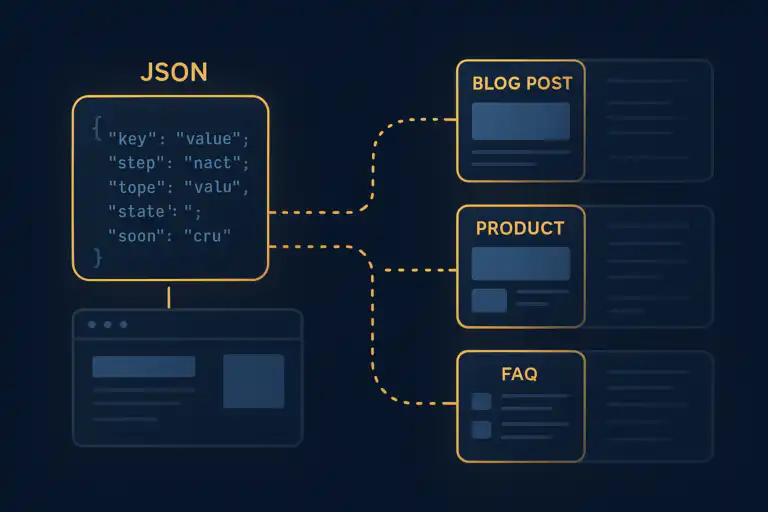
WordPress automatic schema injection routes the correct structured data type to each page template automatically.
Why Automatic Schema Injection Matters for SEO
Google’s Search documentation confirms that structured data is a primary driver of rich results — those enhanced search listings that display star ratings, recipe prep times, event dates, and FAQ dropdowns directly in the SERP. Sites that consistently serve valid schema to Googlebot earn eligibility for these features, which routinely deliver higher click-through rates than standard blue-link results.
The problem for most WordPress site owners is scale. A site with hundreds of posts, dozens of product categories, and multiple author profiles cannot realistically have schema hand-coded on every URL. Automatic injection solves this entirely. Once configured, every new post published, every product added, and every category page created inherits the correct schema without any additional effort.
Rich Results
Star ratings, FAQs, breadcrumbs, and sitelinks become eligible in Google Search.
Scalability
Hundreds of pages receive correct markup the moment they are published.
Consistency
No missed pages, no outdated markup — automation enforces uniformity.
Method 1 — Plugin-Based Automatic Injection
The most accessible path to WordPress automatic schema injection is through a dedicated SEO or schema plugin. These tools handle the conditional logic, the JSON-LD output, and the Google Search Console compatibility out of the box.
Top Plugins for Schema Automation
- Rank Math SEO — Widely regarded as the most feature-complete free option, Rank Math automatically injects schema for articles, products, recipes, events, local businesses, and more. Its schema builder also allows custom graph configurations.
- Yoast SEO — The long-standing market leader outputs a structured data graph including
WebSite,WebPage,BreadcrumbList, and content-specific types automatically. - Schema Pro — Purpose-built for schema, this plugin maps schema types to specific post types and categories, making it ideal for sites needing granular control over which markup fires where.
- All in One SEO (AIOSEO) — Provides automatic schema output with a visual schema generator and supports WooCommerce product schema natively.
For sites that want an integrated approach where schema automation is part of a broader automated SEO workflow, the Rank Authority automated SEO platform provides a compelling solution, combining schema management with technical SEO monitoring in a single system.
Method 2 — Custom Code via WordPress Hooks
For developers who prefer direct control, WordPress’s hook system provides a clean, plugin-free path to automatic schema injection. The wp_head action fires in the of every page load, making it the ideal injection point for JSON-LD blocks.
functions.php — Example
add_action( 'wp_head', 'ra_inject_article_schema' );
function ra_inject_article_schema() {
if ( ! is_single() ) return;
$post = get_queried_object();
$schema = [
'@context' => 'https://schema.org',
'@type' => 'BlogPosting',
'headline' => get_the_title( $post ),
'datePublished' => get_the_date( 'c', $post ),
'dateModified' => get_the_modified_date( 'c', $post ),
'author' => [
'@type' => 'Person',
'name' => get_the_author_meta( 'display_name', $post->post_author )
],
];
echo '';
}
This approach fires only on single post views (is_single()), pulls live post data, and outputs a valid JSON-LD block every time — automatically, for every post, forever. You can extend this pattern with additional conditionals for pages, archives, WooCommerce products, and custom post types, building a fully bespoke schema injection system without any plugin overhead.

Plugin-based and code-based approaches to schema injection each offer distinct advantages depending on your technical setup.
Method 3 — Conditional Schema by Post Type and Taxonomy
Advanced implementations of WordPress automatic schema injection use a routing layer — a set of conditional checks that determine which schema type to output based on the current template context. This mirrors how enterprise-level SEO platforms operate and is achievable in WordPress using native template tags.
Schema Routing Logic — Quick Reference
| WordPress Condition | Schema Type Injected |
|---|---|
is_single() |
BlogPosting / Article |
is_page() |
WebPage |
is_product() (WooCommerce) |
Product |
is_author() |
Person |
is_front_page() |
WebSite / Organization |
Testing and Validating Your Injected Schema
Automatic injection is only valuable if the output is valid. Google’s Rich Results Test and the Schema Markup Validator at schema.org are the two essential tools for confirming your markup is correctly structured. Both accept a live URL and return a parsed view of every schema entity detected, along with any errors or warnings.
Beyond one-off testing, ongoing monitoring matters. Schema errors introduced by plugin updates, theme changes, or new post types can silently break your rich result eligibility across hundreds of pages. Pairing your schema setup with a real-time SEO monitoring tool — such as the real-time SEO issue alerts from Rank Authority — ensures you are notified the moment something breaks, rather than discovering the problem weeks later in a traffic drop.
Frequently Asked Questions
Conclusion
WordPress automatic schema injection is one of the highest-leverage technical SEO improvements you can make to a WordPress site. Whether you choose a plugin like Rank Math, a custom hook-based implementation, or a conditional routing system that maps schema types to every template in your theme, the outcome is the same: every page on your site communicates its structure clearly to search engines, at scale, without ongoing manual effort.
The sites that consistently earn rich results are not the ones with the most content — they are the ones whose content is the most legible to machines. Implementing automatic schema injection today puts your WordPress site in that category permanently. Start with a proven plugin, validate your output, monitor for regressions, and let the structured data work silently on your behalf every time Google crawls a URL.
Take the Next Step
Pair your schema automation with a complete automated SEO workflow. Explore the Rank Authority automated SEO platform to see how schema injection, technical audits, and real-time monitoring work together to move your rankings forward. For a deeper walkthrough, see our WordPress SEO Auto Publish: The Complete Guide.

