

Technical SEO — Core Concepts
A complete guide to understanding, building, and optimizing your crawling list for maximum search engine performance. For a deeper walkthrough, see our Checking Domain Authority: The Complete Guide (2025).
A crawling list is a prioritized collection of URLs that a search engine bot — or an SEO audit tool — queues up to visit, analyze, and index. Getting this list right is not optional. It is one of the most direct levers you have over how search engines discover, evaluate, and rank your content.
Quick Answer
A crawling list is the ordered set of URLs that bots or audit tools process during a crawl session. It controls which pages get indexed, how crawl budget is spent, and ultimately which pages have a chance to rank in search results.
What Is a Crawling List?
When a search engine like Google sends its bot — Googlebot — to visit your website, it does not wander randomly. It follows a structured queue of URLs. That queue is the crawling list. According to Wikipedia’s overview of web crawlers, this list-driven approach has been the foundational architecture of all major crawlers since the earliest days of the web.
In practical SEO, the term “crawling list” applies in two related contexts: the internal queue Googlebot maintains as it discovers your pages, and the custom URL list you feed into an SEO audit tool like Screaming Frog or Sitebulb when running a manual crawl. Both concepts share the same logic — the list determines scope, priority, and coverage.

A crawling list organizes URLs into a prioritized queue that guides bots through your site architecture.
Why Your Crawling List Directly Impacts Rankings
Google allocates a finite crawl budget to every website. Crawl budget is the number of pages Googlebot will crawl within a given time window. If your crawling list is bloated with low-value URLs — thin pages, redirect chains, duplicate content, or staging URLs accidentally left public — bots consume that budget on pages that will never rank, while your most important content waits in the queue.
The downstream effect is real: pages that are not crawled cannot be indexed, and pages that are not indexed cannot rank. A clean, well-structured crawling list is therefore not just a technical housekeeping task — it is a direct ranking signal amplifier.
Without Optimization
- Crawl budget wasted on junk URLs
- Important pages crawled infrequently
- New content delayed in indexing
- Duplicate pages confuse bots
With Optimization
- Budget focused on high-value pages
- Faster indexing of new content
- Cleaner crawl signals to Google
- Improved rankings over time
How to Build an Optimized Crawling List: Step-by-Step
Follow these five steps to build a crawling list that makes every bot visit count.
Step 1 — Export Your XML Sitemap URLs
Your XML sitemap is the most authoritative starting point for any crawling list. Export all URLs it contains — this ensures you capture every page you have already declared as indexable. Tools like Google Search Console’s URL Inspection tool can cross-reference which of these have actually been crawled recently.
Step 2 — Audit and Remove Low-Value URLs
Scrub the list aggressively. Remove any URL that carries a noindex directive, sits behind a redirect chain, contains duplicate or near-duplicate content, or represents a parameter-based URL variant. These entries dilute your crawl budget without contributing to rankings.
Step 3 — Segment and Prioritize by Page Value
Not all pages deserve equal crawl frequency. Group URLs into tiers: Tier 1 (homepage, top-converting pages, cornerstone content), Tier 2 (category pages, pillar posts), and Tier 3 (supporting blog posts, archive pages). Assign crawl priority accordingly in your sitemap’s
Step 4 — Configure Your Crawl Tool Settings
Load your refined list into Screaming Frog SEO Spider, Sitebulb, or your preferred audit tool. Set crawl depth to match your site architecture, respect your robots.txt rules, and configure crawl speed to avoid triggering server rate limits. For large sites, consider segmenting the list into batches.
Step 5 — Analyze Results and Iterate
A crawling list is never a one-time document. After each crawl, review error reports, identify orphan pages that lack internal links, and flag any new redirect chains. Schedule a full crawling list audit at minimum every quarter — monthly for large or frequently updated sites.
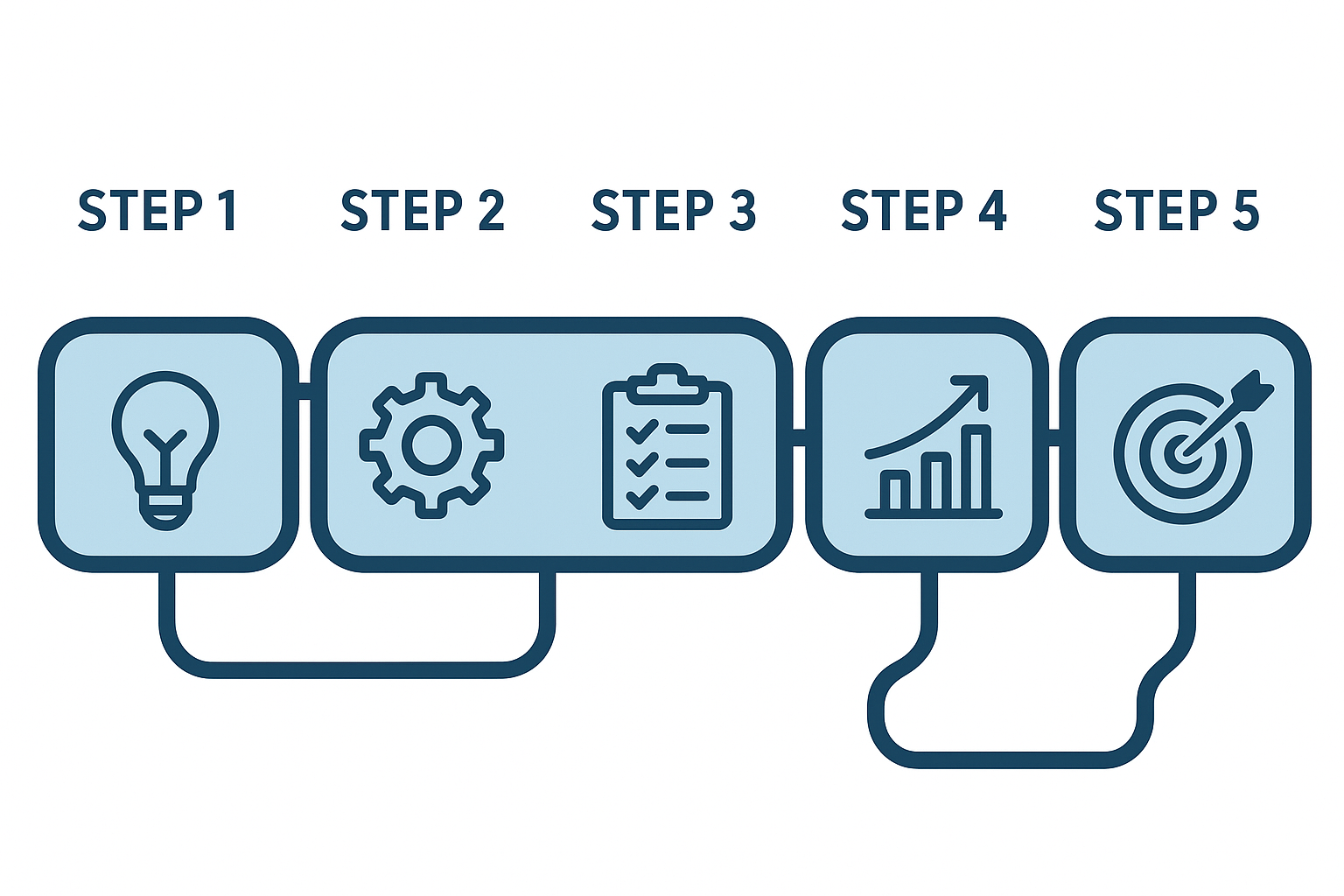
The five-step framework for building a high-performance crawling list that maximizes crawl budget efficiency.
Best Tools for Managing Your Crawling List
Choosing the right tool determines how efficiently you can build, analyze, and iterate on your crawling list. Here are the most widely used options:
Common Crawling List Mistakes and How to Fix Them
Even experienced SEOs make errors when constructing their crawling lists. These are the most costly:
Including Noindex Pages
Pages with a noindex meta tag should never appear in your crawling list. While Googlebot may still crawl them, including them in your own audit list wastes time and skews your reports.
Ignoring Orphan Pages
Orphan pages — URLs with no internal links pointing to them — are invisible to Googlebot unless they appear in your sitemap or crawling list. Identify them through crawl gap analysis and either add internal links or remove them from the list entirely.
Never Updating the List
A static crawling list quickly becomes outdated. New pages are published, old pages are deleted, and URL structures change. Treat your crawling list as a living document with a scheduled review cadence.
Crawling Parameter URLs
Session IDs, tracking parameters, and faceted navigation generate thousands of near-duplicate URLs. Block these via robots.txt or Google Search Console’s URL parameter handling tool, and ensure they never appear in your crawling list.
Regular audits of your crawling list help catch errors before they drain crawl budget or suppress rankings.
Frequently Asked Questions
What is a crawling list in SEO?
A crawling list is a prioritized collection of URLs that a search engine bot or SEO audit tool queues up to visit, analyze, and index. It determines which pages get discovered, how frequently they are revisited, and how crawl budget is allocated across a website.
How does a crawling list affect crawl budget?
Crawl budget is the number of pages Googlebot will crawl on your site within a given timeframe. Your crawling list directly impacts how that budget is spent — a well-structured list ensures bots focus on valuable pages rather than low-quality or duplicate URLs.
How often should I update my crawling list?
At minimum, review and update your crawling list quarterly. For large e-commerce sites or news publishers where content volume changes daily, a monthly or even weekly review cycle is advisable.
What tools help manage a crawling list?
The most popular tools include Screaming Frog SEO Spider, Google Search Console, Sitebulb, and Ahrefs Site Audit. Each offers different crawl configuration options, depth controls, and reporting features to help you build and maintain an effective crawling list.
Conclusion
Build Your Crawling List With Intention
Your crawling list is the blueprint Googlebot follows when it visits your site. Every URL you include is a decision about where your crawl budget goes. Start with your sitemap, strip out low-value URLs, tier your pages by business importance, and revisit the list on a regular cadence. The sites that rank consistently are the ones that make these decisions deliberately — not accidentally.
For deeper guidance on technical SEO strategy, crawl budget optimization, and site architecture, Rank Authority provides comprehensive resources built for SEOs who want to move rankings, not just audit them.

